CyberRatings.org Publishes Test Results on Cloud Network Firewalls

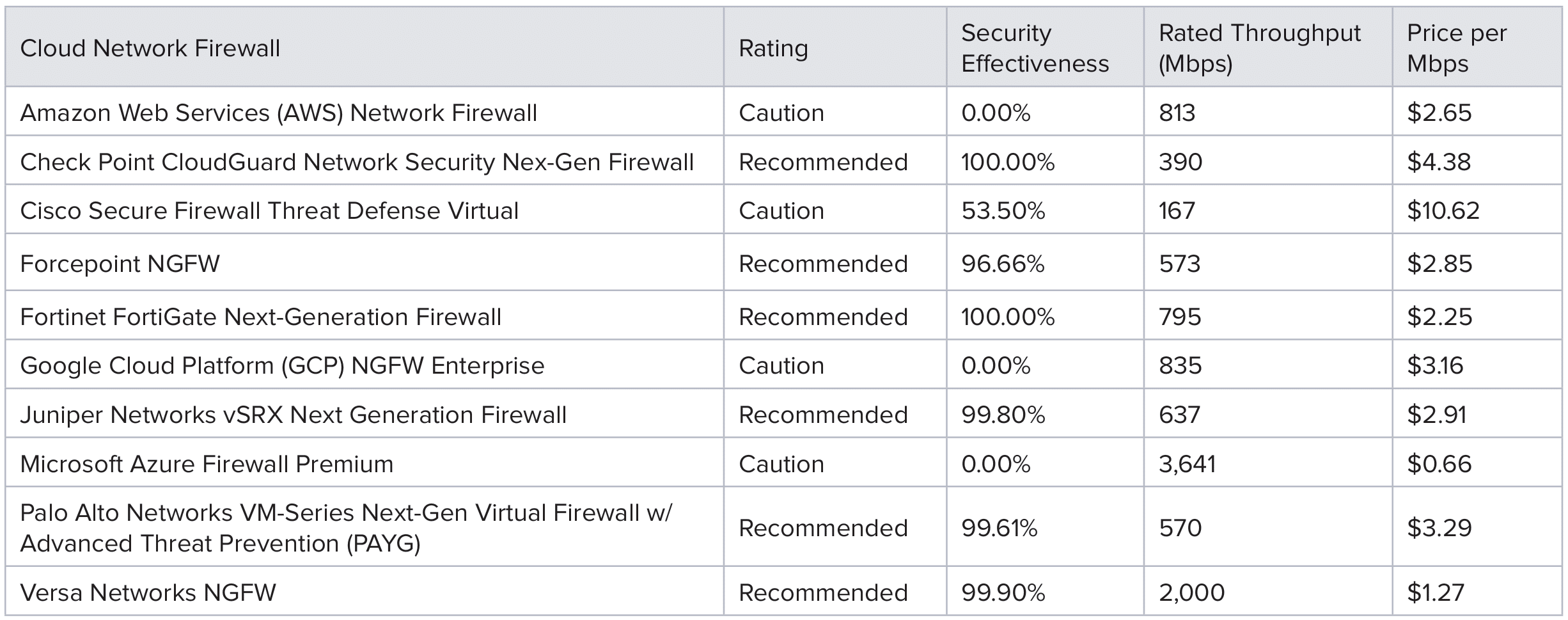
Austin, TX – April 2, 2025 – CyberRatings.org (CyberRatings), the non-profit entity dedicated to providing confidence in cybersecurity product efficacy, today released its Q1 2025 Comparative Test Report on Cloud Network Firewalls (CNFW), along with separate, in-depth reports for each of the ten cloud firewall solutions tested. Security effectiveness results ranged from 0% to 100%.

Key Findings:

  • Third-party firewalls from Check Point, Fortinet, Juniper Networks, Palo Alto Networks, and Versa Networks demonstrated the highest security effectiveness blocking exploits and evasion tactics. Results ranged from 99.61% to 100%.
  • Native cloud firewalls from Amazon Web Services (AWS), Google Cloud Platform (GCP), and Microsoft Azure offer a convenient alternative, but all received 0% Security Effectiveness as they allowed attacks to bypass existing defenses.
  • Google Cloud Platform’s Next Generation Firewall (NGFW) service leverages Palo Alto Networks technology. We attribute the differences in security effectiveness and performance results between the two platforms to each provider independently selecting and deploying different software versions based on their own criteria.
  • A total of six firewall solutions were Recommended and four received Caution ratings.

In the Cloud Service Provider Native Firewall test from November 2024 only 522 exploits were used in the Part 1 “Mini-Test”, but not evasions. For this round of testing, a greater number of exploits were deployed, and evasions were introduced to the test samples:

  • False Positives: 2,760 samples from various business-critical files and applications, ensuring security measures did not disrupt legitimate traffic.
  • Exploits: 2,028 attack samples from widely exploited vulnerabilities in enterprise environments.
  • Evasion Techniques: 2,500 attacks spanning 27 evasion techniques tested across multiple network layers to bypass firewall defenses.
  • Performance Metrics: 46 different stress and capacity tests under diverse workloads.
  • Stability & Reliability: Seven extended tests simulating prolonged real-world attack and operational scenarios.

CyberRatings evaluated firewall security by testing for evasion detection at three separate layers of the Open Systems Interconnection (OSI) model, specifically Layers 3, 4, and 7. Missing lower-layer evasions had the greatest impact on the overall score because these layers form the foundation of firewall security at the fundamental networking level, and when these lower layers are compromised, the firewall’s primary protective function is undermined. Points were deducted based on the firewall’s ability—or inability—to detect evasions:

  • A missed evasion from the Layer 3 level resulted in a 50% deduction per category, up to a potential category maximum reduction of 100%.
  • Missing a Layer 4 evasion led to a 20% deduction per category, up to a potential category maximum reduction of 60%.
  • A miss at Layer 7 incurred only a 1% deduction per category, up to a potential category maximum reduction of 10%.

Layers 3 and 4 evasions are particularly concerning since all modern applications rely on IP and TCP. Vulnerabilities at these layers can be exploited across a wide range of systems—from cloud services to enterprise applications.

“Until cloud service provider native firewalls provide better protection, customers should be looking to third parties for their cloud security needs,” said Vikram Phatak, CEO of CyberRatings.org. “Traditional third-party security vendors have demonstrated that they bring significant value to customers.”

Below is a summary of the Ratings:

The cloud firewalls were tested using Keysight’s CyPerf v5.0 software testing platform in addition to CyberRatings’ in-house developed test tools. Enterprises can easily perform similar testing with a 2-week free trial from Keysight. Further details of the CyPerf strike library can be found here: https://www.keysight.com/us/en/products/network-test/cloud-test/cyperf.html

Exploring Cloud Service Provider Native Firewalls

In April 2024, we published the results of our annual Cloud Network Firewall test. In that test, the AWS Network Firewall exhibited a mere 5.39% Security Effectiveness score, the lowest result in our comparison. That extremely low Security Effectiveness score was not considered to meet any reasonably acceptable standard, and it was concerning enough that we decided to re-evaluate AWS’ offering six months later to see if any improvements might have been made.

We expanded our testing to include Microsoft Azure Firewall and Google Cloud Platform (GCP) Cloud NGFW and published those results on November 26, 2024. Combined, the “Big Three” now account for two-thirds of the growing cloud provider market. Our goal was to assess their native firewall capabilities and understand their strengths and limitations against a variety of attacks.

Part One of a Two-Part Test

This testing was conducted as part one of a two-part series examining cloud network firewalls. It was limited to a subset1 of exploits from Keysight’s CyPerf v5.0 software testing platform. In part two, we will increase the difficulty of the test by widening the scope and depth of testing. The second part of the test will also compare cloud service provider native offerings against market leading third-party cloud network firewall providers. Publication of part 2 will be in Q1 of 2025.

Retesting AWS Network Firewall

Here’s a rundown of our journey with the AWS Network Firewall, including our steps and what we discovered along the way. We decided to publish these additional details so that customers of AWS Firewalls can investigate how the firewall would work in their environments.

Setting Up and Initial Testing

First, we set up the AWS Network Firewall with its basic firewall features, such as access control rules. We wanted to ensure that the fundamental functionalities were working correctly before diving deeper. During our initial testing, these features functioned as expected, effectively controlling access according to our configurations. Then, we executed a series of attacks to test the firewall’s threat detection capabilities. Surprisingly, the AWS Network Firewall only blocked two out of all the attacks we launched. This unexpected result prompted us to question whether the firewall was correctly configured or if there was an issue with our setup.

Double-Checking the Configuration

To rule out any misconfigurations on our part, we carefully double-checked our firewall settings against the official AWS documentation. We reviewed each configuration parameter, ensuring everything matched exactly as prescribed. Our review confirmed that the configuration was indeed correct.

Validating the Firewall Deployment

We conducted additional tests to verify that the AWS Network Firewall was deployed correctly and that all network traffic was routed through it rather than bypassing the firewall and going directly to the internet. We transmitted both normal and malicious traffic across the firewall to observe its behavior.

All traffic forwarded or blocked by the firewall rules was accurately logged in the AWS flow and alert logs via AWS CloudWatch. This validation step reassured us that the firewall was operational and actively monitoring the network traffic as intended.

Diving Deeper with Detailed Analysis

Next, we tested specific threat detection capabilities to confirm that the firewall was functioning correctly. We selected three Suricata rules from the AWS-managed ruleset and generated traffic that matched the malicious content described in those rules.

Case Study: The daddy.linkpc.net Domain

One of the domains we tested was daddy.linkpc.net. The Suricata signature associated with this domain is designed to drop any traffic attempting to access it. Here were the steps we took:

  1. Attempted to Resolve the Domain: We tried to resolve daddy.linkpc.net, mimicking a user or system attempting to access a malicious domain.
  2. Firewall Detection: The AWS Network Firewall detected this malicious activity using the predefined security signature (Signature ID 2853242).
  3. Action Taken: The firewall blocked the DNS query, effectively preventing any communication with the malicious domain.
  4. Observation: The alert triggered by this activity was visible in the AWS Alert Logs, confirming that the firewall’s detection mechanisms were working as expected for this case.

At this stage, we theorized that most of the attacks bypassed the firewall because it lacked specific rules for those particular attacks. To investigate this possibility, we decided to delve deeper into the firewall’s ruleset.

Matching CVEs from AWS Suricata Rules to CyPerf Attacks

Suricata is a high-performance, open-source network analysis and threat detection software. It’s widely used by both private and public organizations and is embedded by major vendors to protect their assets. Suricata uses a signature-based approach to detect threats, which relies on predefined rules and patterns.

CVE stands for Common Vulnerabilities and Exposures. It is a glossary that classifies vulnerabilities. Its purpose is to identify, define, and catalog publicly disclosed cybersecurity vulnerabilities.

To test our theory, we needed to determine whether the AWS Network Firewall had rules corresponding to the attacks Cyperf was using. Here’s how we approached it:

  1. Extracted CVEs from Suricata Rules: We extracted all the CVEs listed in the Suricata rules used by the AWS Network Firewall.
  2. Matched CVEs with CyPerf Attacks: We compared these CVEs with the attacks available in CyPerf to identify those that matched.
  3. Executed Matched Attacks: We then executed only the attacks with corresponding CVEs in the firewall’s ruleset.

The Result: We found very few rules matched CVEs. This is because many Suricata rules did not contain CVE details, and out of those that did, the AWS Firewall only blocked two attacks. Further, most of the signatures were not relevant for cloud environments.

Observations and Concerns

Through our analysis, we observed the following about AWS Network Firewall’s capabilities:

  • Reliance on Basic Regular Expressions: Many signatures in the firewall’s ruleset rely on simple regular expressions. While effective for straightforward patterns, this approach can be insufficient against more sophisticated or obfuscated attacks.
  • Design Focus: Many signatures appear to be designed for home or small office environments rather than for cloud or server workloads. This could limit the firewall’s effectiveness in enterprise or cloud-native scenarios.
  • Total Signatures and Limitations: As of October 2024, the signatures contained over 21,500 preconfigured rules. These signatures are organized into groups, each containing thousands of signatures. Therefore, to enable one, you must enable all in the group. The AWS Firewall also limits the number of signatures you can enable. The maximum number of signatures is 30,000 for stateful and stateless firewall
  • Distribution of Rules:
    • Approximately 10% of the rules protect web browsers.
    • Around 17,500 rules monitor outbound connections (post-infection activities).
    • Only about 4,000 rules focus on inbound traffic.
    • Lack of CVE Information: Most signatures do not contain CVE details, making it challenging to assess the firewall’s coverage against known vulnerabilities.

Assessing the Severity of Limitations

To illustrate the potential impact of these limitations, let’s consider an example involving domain-based signatures:

Example: Circumventing Domain-Based Signatures

  • Signature Limitation: Suppose there’s a signature designed to block traffic to cnn.com.
  • Potential Circumvention: An attacker could easily bypass this signature by slightly altering the domain name to cnn.com, using a subdomain like news.cnn.com, or adding a character before or after cnn.com.
  • Issue: If the signature only matches the exact domain cnn.com or tries to match a precise number of characters, it fails to detect these variations, allowing malicious traffic to pass undetected.
  • Implication: This example demonstrates how attackers can exploit simple signatures by making minor changes, highlighting the need for more robust and comprehensive detection mechanisms.

Our Journey with Other Cloud Service Provider Firewalls

Azure

Unfortunately, we came into this test blind; Azure seems to use a propriety, closed-source security stack. It provides little visibility into how it works or how to change anything. You pay for it, turn it on, and it does “stuff.” This limitation is frustrating, given the results, as it removes the user’s ability to adjust protection based on their unique deployment.

The lack of visibility into rules and/or related CVE information limits the user’s ability to understand how well the protection aligns with their environment, applications, and workloads.

Google Cloud Firewall (GCP)

Like Azure, this is also closed-source security software. However, we discovered that GCP’s firewall is running software from Palo Alto Networks. We have worked with Palo Alto Networks for many years and expected much better results than we saw reflected in the scores. GCP directs you to the Palo Alto Networks website for information on the deployed protection.
Recommendations:

  • Third-Party Firewall: Until Cloud Service Provider’s Native Firewalls offer adequate protection, we recommend using a third-party cloud firewall (offered through the respective CSP’s marketplace).
  • Custom Rule Creation: Consider creating custom rules tailored to your specific environment and attack surface.
  • Supplementary Security Measures: Consider using additional security technologies to complement the Cloud Network
  • Update & Test: Update your firewall regularly and test each update. Attackers are continuously innovating; defenses that work today may not work tomorrow. It is important that your defenses are current and that you verify they work as expected.
  • Supplementary Security Measures: Consider using additional security technologies to complement the Cloud Network Firewalls based on test results.

Our journey highlighted the importance of not solely relying on default configurations and the need for a proactive approach to network security. By understanding the capabilities and limitations of tools like Cloud Service Provider Firewalls, organizations can better protect their assets and respond to evolving threats.

For further information on how to best configure these products, please reference Best Practices for Cloud Network Firewall Deployment in 2024: Cloud Service Providers (CSP).


[1] We limited the scope of exploits to those that: 1) targeted servers, 2) were applicable to applications or workloads that could be run on a cloud virtual machine or bare metal platform, 3) were for known exploits over the last 10 years with a CVSS score of medium to high.


CyberRatings.org Announces Test Results for Cloud Service Provider Native Firewalls

Austin, TX – November 26, 2024 – cyberratings.org/ (CyberRatings), the non-profit entity dedicated to providing confidence in cybersecurity products and services through its research and testing programs, has completed an independent “Mini-Test” of Cloud Service Provider (CSP) Native Firewalls from Amazon Web Services (AWS), Microsoft Azure, and Google Cloud Platform (GCP). Security effectiveness protection ranged from 0.38% to 50.57%.

In today’s cloud-centric environment, businesses often face a critical choice regarding the security of their cloud infrastructure. They can rely on firewalls offered directly by Cloud Service Providers (CSPs) or use independent security vendor firewall offerings typically available through the respective CSP’s marketplace. Security effectiveness is a crucial factor in selecting the right firewall solution, as it directly impacts the organization’s ability to protect against cyber threats.

The CSP firewalls were tested against 522 exploits using Keysight’s CyPerf v5.0 software testing platform, offering an evidence-based look at how well these native solutions withstand real-world security threats. Only known Common Vulnerabilities and Exposures (CVEs) from the last ten years with a severity of medium or higher were used to assess security effectiveness, usability, and protection. The exploit (CVE) types targeted servers and are typically relevant to cloud workload deployments.

Mini-Test Results:

“This was designed to be an entry level test,” said Vikram Phatak, CEO of cyberratings.org/. “The exploits were straightforward; we didn’t apply any evasions which is normally how attackers bypass security products. The number of missed exploits is concerning. Until cloud native firewalls demonstrate they have a higher level of security effectiveness to protect against cyber threats, we strongly recommend that customers consider third-party providers with a proven track record.”

This test is part one of a two-part test. Part two will include a higher number of exploits, along with evasions. The second part of the test will also compare cloud service provider native solutions against market leading third-party cloud network firewall providers.

The native firewalls were tested using Keysight’s CyPerf v5.0 software testing platform. Enterprises can easily replicate the results with a 2-week free trial from Keysight. Further details of the strike library can be found here: https://www.keysight.com/us/en/products/network-test/cloud-test/cyperf.html

2024 Best Practices for Cloud Network Firewall Deployment

The security industry is working towards a secure by default configuration. However, when setting up products for the 2024 Cloud Network Firewall group test, we found that not all products are secure by default. We, therefore, documented the changes we made and are publishing them in this guide.

Last year, the Cybersecurity & Infrastructure Security Agency (CISA), along with ten U.S. and international partners, published guidelines for their “Secure by Design, Secure by Default” principle. In their April 2023 publication, they stated the following:

“Secure-by-Default” means products are resilient against prevalent exploitation techniques out of the box without additional charge. These products protect against the most prevalent threats and vulnerabilities without end-users having to take additional steps to secure them. Secure-by-Default products are designed to make customers acutely aware that when they deviate from safe defaults, they are increasing the likelihood of compromise unless they implement additional compensating controls.

This guide should be used as a supplement to what the vendors already make available to their customers. Please see the links below to the best practices and guides for each product we tested. We have also provided additional information for three products: Cisco Secure Firewall Threat Defense Virtual, Palo Alto Networks VM-Series, and Amazon Web Services (AWS) Network Firewall.

Cloud Network Firewall Test Topology

The following steps were taken for each firewall:

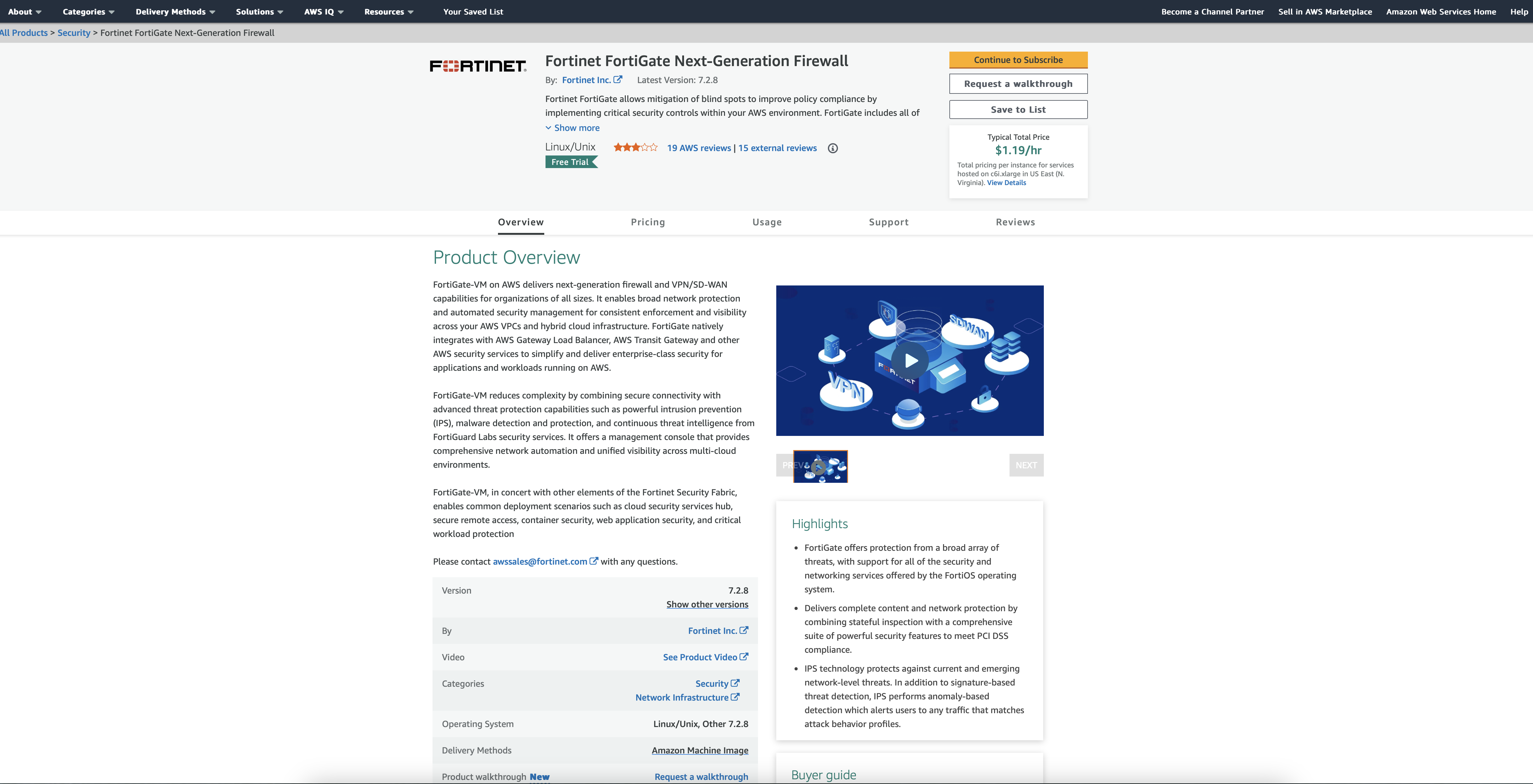
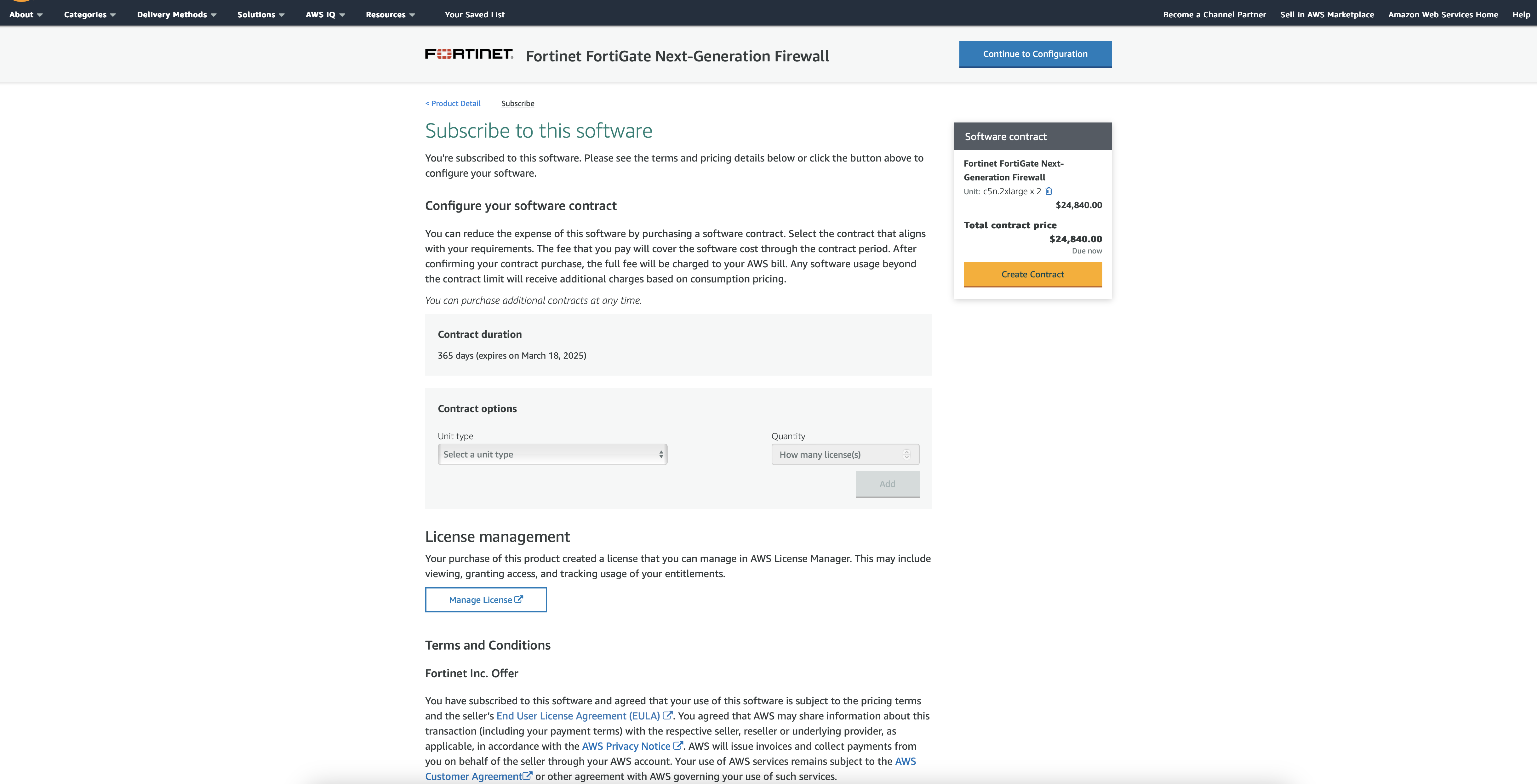
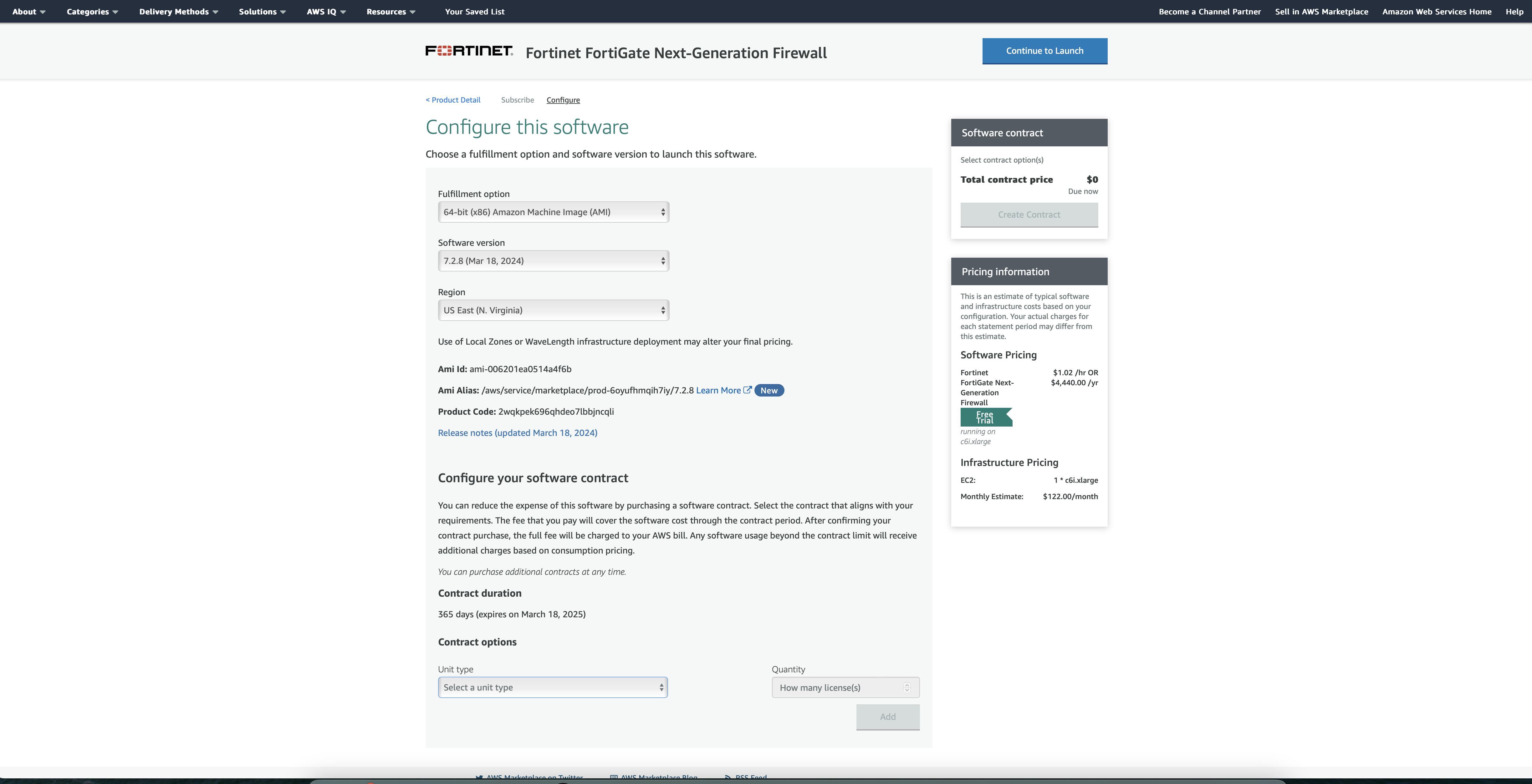
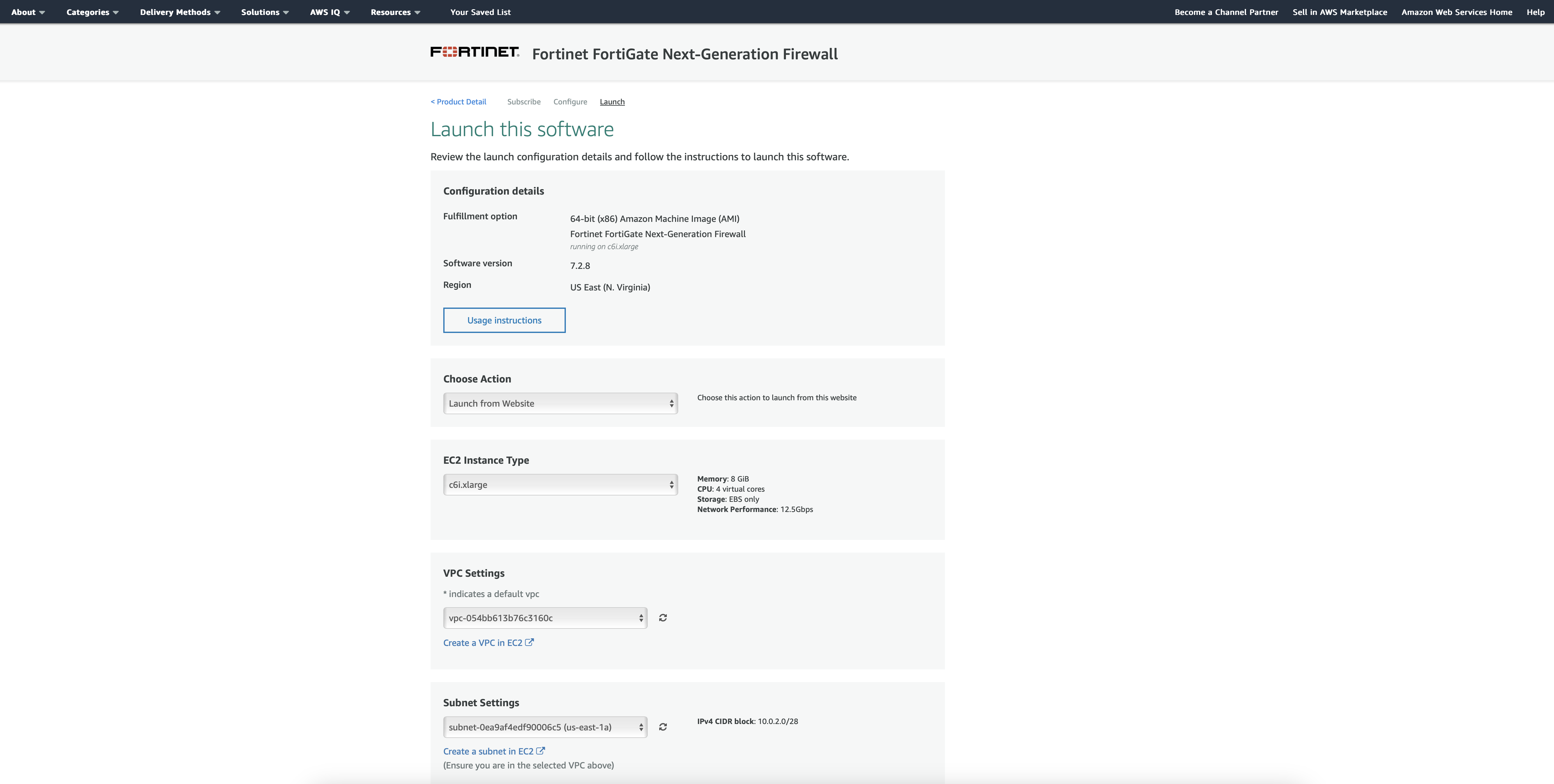
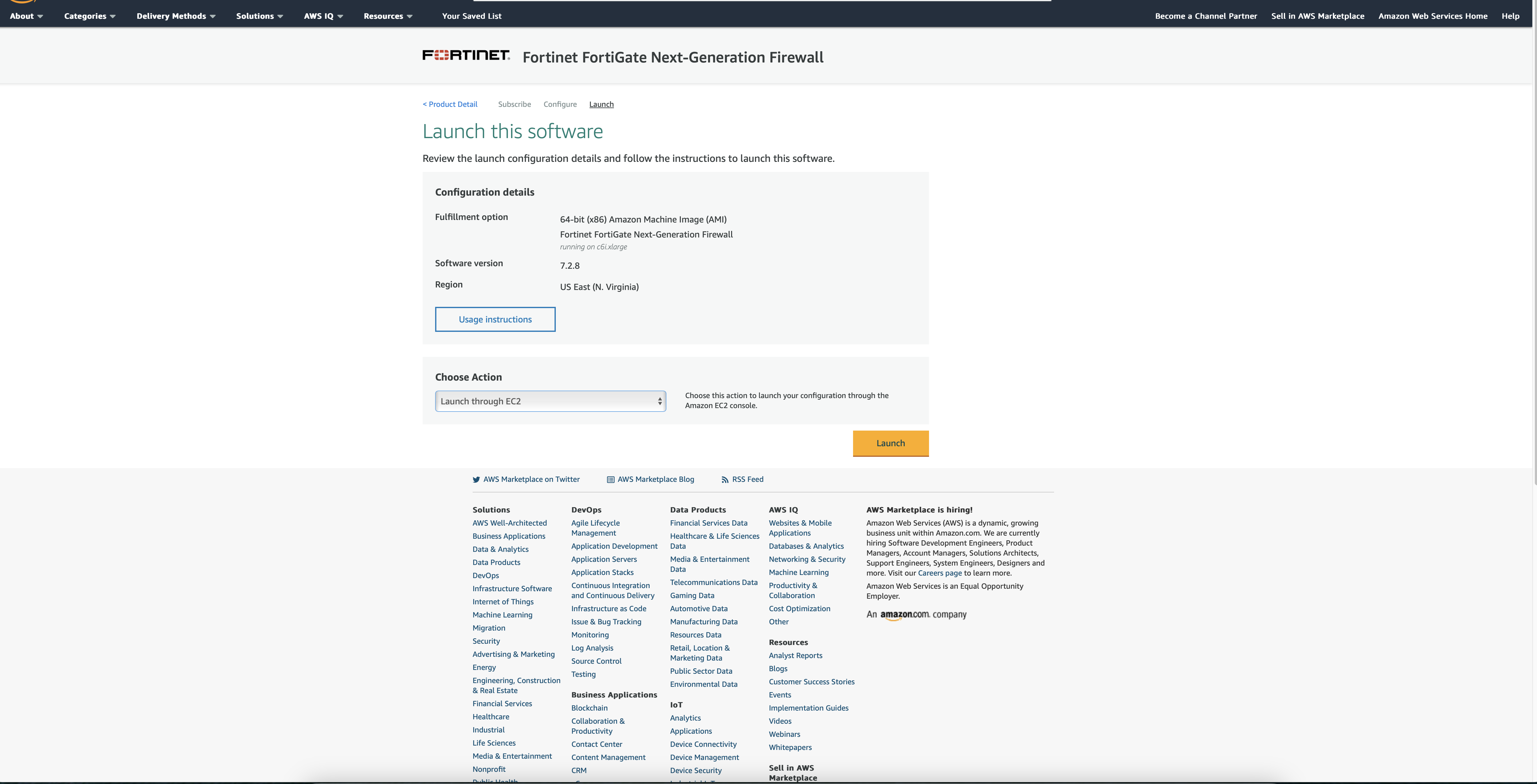
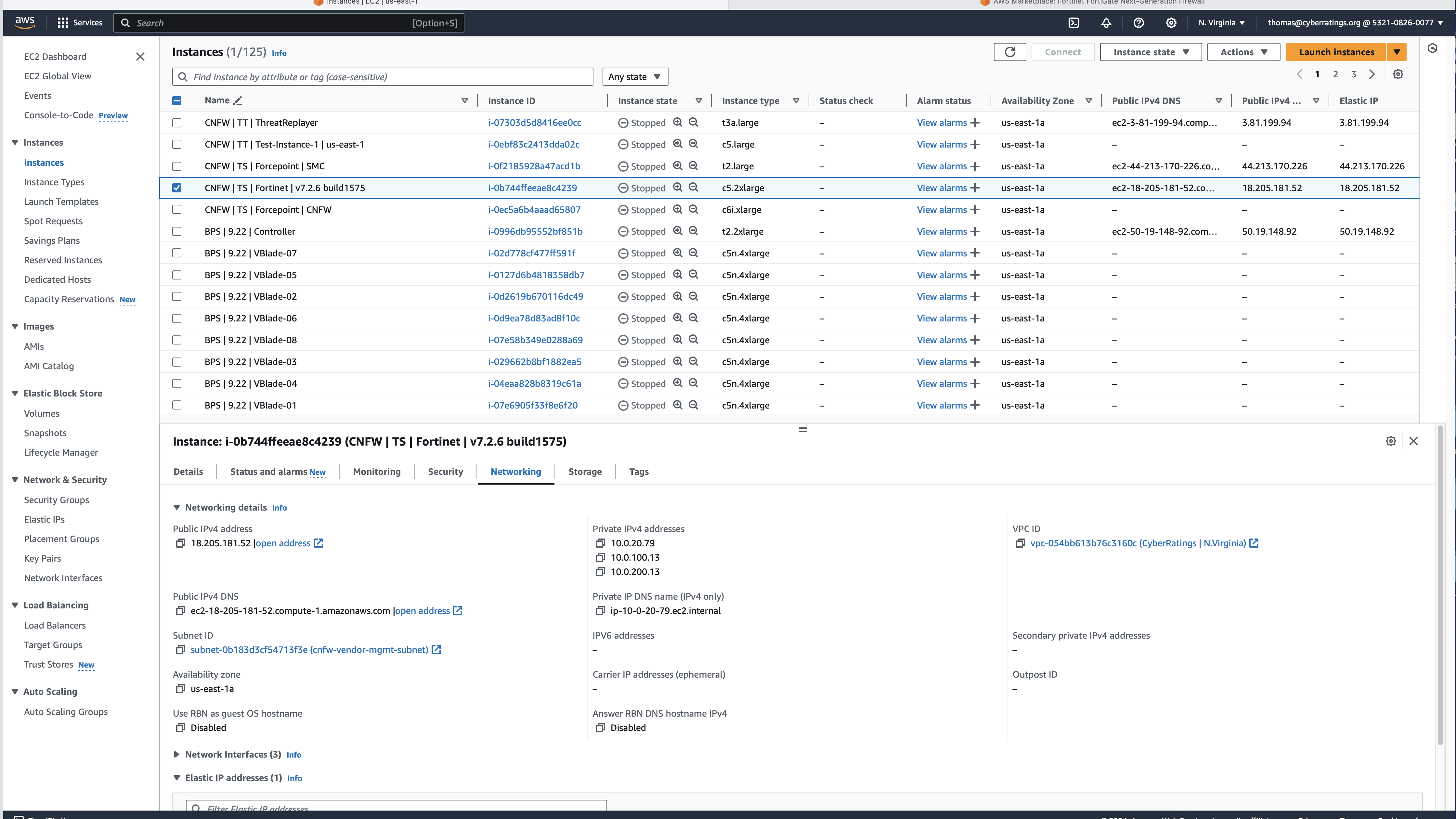
Deploy the firewall in Amazon Web Services (AWS). For this example, we are using Fortinet:

  1. Review Firewall options and pricing, then Click to Subscribe.

2. Once you have picked your instance type, Continue to Configuration.

3. Review selection and Continue to Launch.

4. Launch the software from the website, or the EC2 dashboard – selected in the drop-down menu.

5. In the EC2 dashboard, define who has access to the firewall, launch Instance.

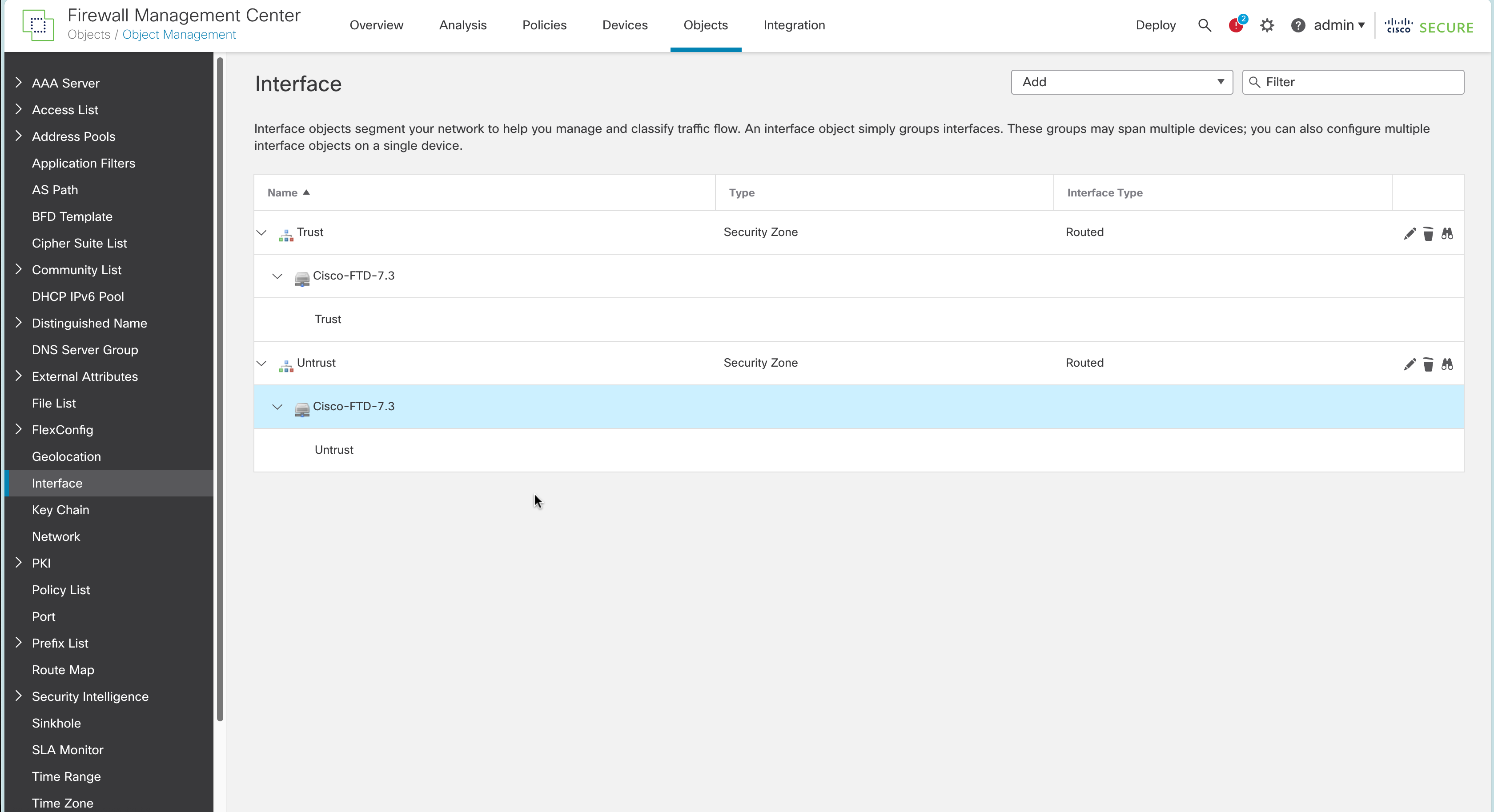
  • Connect the interfaces required for the topology. This is information that is found in each vendor guide.
  • Register the device to the centralized management system. This is information that is found in each vendor guide.
  • Validation of license/s, which in turn enabled software updates, threat updates, etc. This is information that is found in each vendor guide.
  • Define access policies:
    • Trust to untrust
    • Untrust to trust

  • Define IPS policies:
    • Enable threat signatures, advanced protection, cloud lookup, etc. Each product handles this differently, but this information is in their guides.
  • Upload the required server certs, keys, and CA certs if needed. This is information that is found in each vendor guide.
  • Define TLS decryption policies (1.2 and 1.3). Configure it to decrypt all traffic. We make a few exceptions to test whether the product can bypass decryption based on specific IP addresses or domain name(s). If something cannot be decrypted or is using an older TLS/SSL version and or an insecure cipher then the product is set to block.
  • Link IPS and TLS policies to the overall access policy.
  • Validate configuration:

Make sure you can pass traffic.

Make sure you can block attacks by sending something malicious.

Tune out false positives.

Firewall Configurations

For each firewall listed below, we have included:

  • Link to the AWS page where the firewall can be selected and deployed
  • Link to best practices and additional information

Amazon Web Services (AWS) Network Firewall

Product, best practices, and documentation: https://aws.amazon.com/network-firewall/

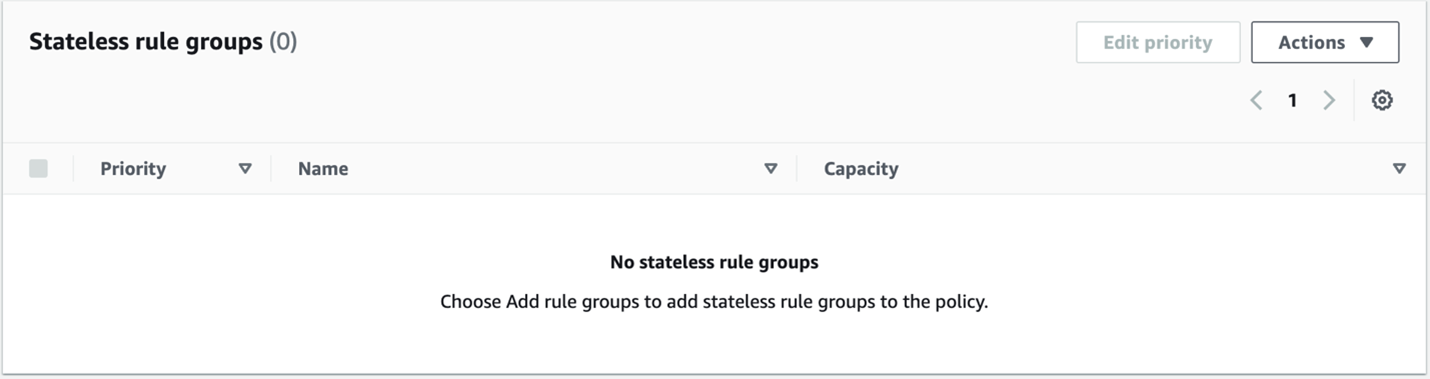
Following the best practices resulted in a deployment that was unable to stop any threats in our Cloud Network Firewall testing harness. After consulting AWS, we were instructed to make changes to the policy. The resulting deployment was successful in blocking 5.39%.

The configuration suggested by AWS:

  • No stateless rules

  • No default stateful action

  • Only Alert actions in the unmanaged signatures

This configuration should send all traffic through the inspection engine.

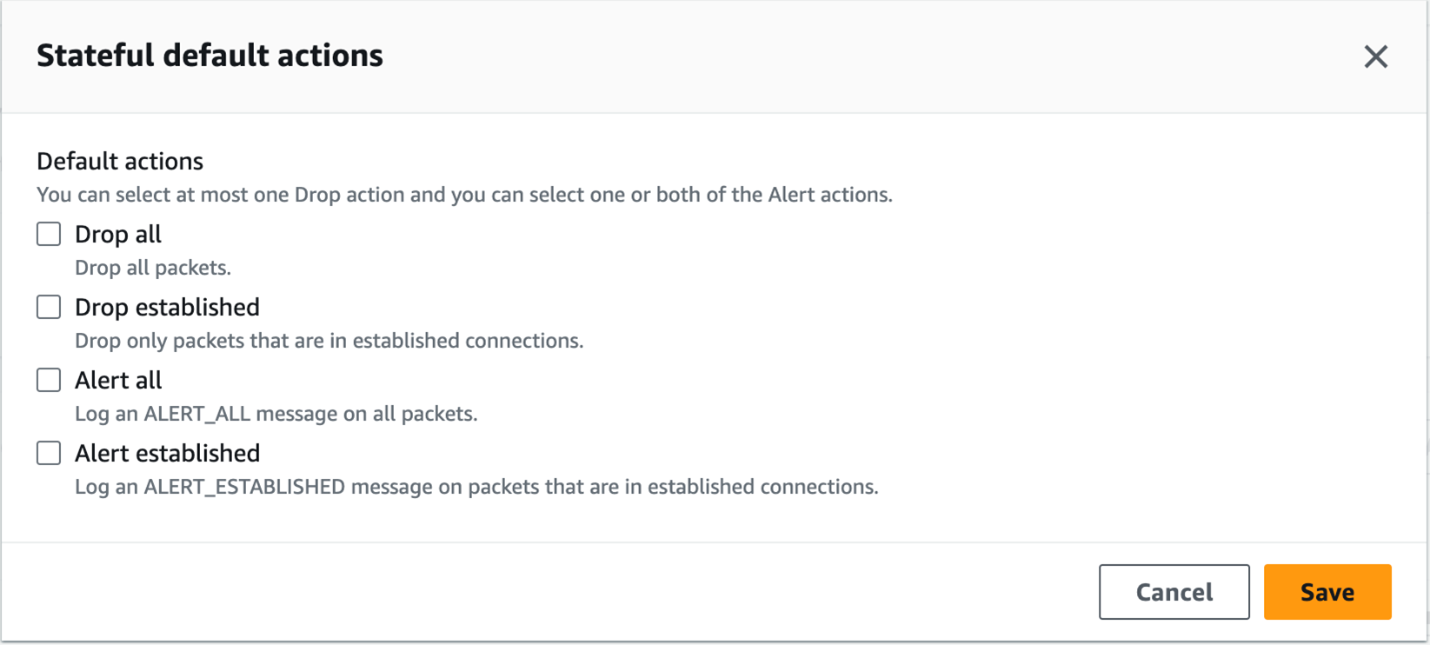
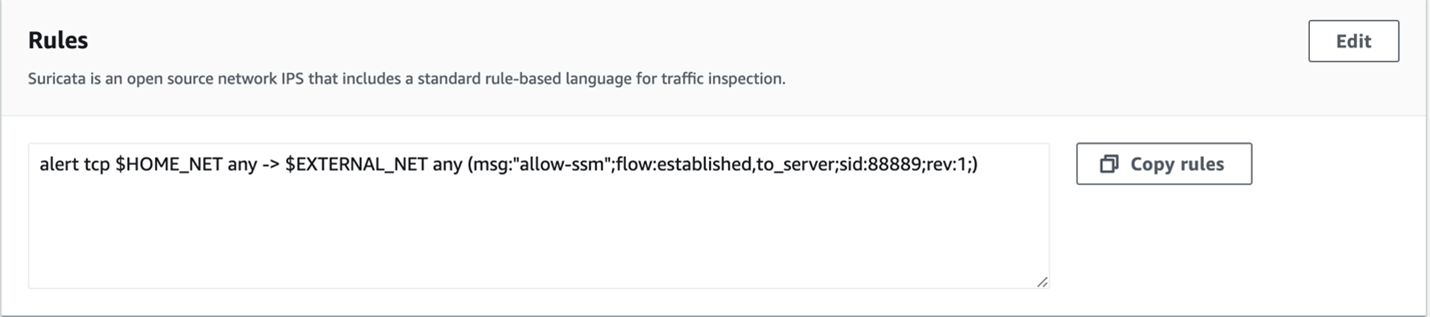
Our configuration that was tested before the conversation with AWS was slightly different. We had a rule for all stateless traffic to be forwarded to the stateful engine. Under the Stateful default actions, we had “Drop established,”“Alert all,” and “Alert established enabled. For rules we had the following:

alert tcp $HOME_NET any -> $EXTERNAL_NET any (msg:”allow-ssm”;flow:established,to_server;sid:88889;rev:1;)
pass tcp $HOME_NET any -> $EXTERNAL_NET any (msg:”allow-ssm”;flow:established,to_server;sid:8888;rev:1;)
pass tcp any any -> any any (msg:”allow-ssm”;flow:established,to_server;sid:888888;rev:1;)
pass UDP any any -> any any (msg:”allow-udp”;sid:88881;rev:1;)
pass ICMP any any -> any any (msg:”allowing-ourbuddyping”;sid:88882;rev:1;)

Both configurations resulted in the same security block rate of 5.39%.

Barracuda CloudGen Firewall

Follow their instructions; the product doesn’t require any special configuration.

Product page: https://aws.amazon.com/marketplace/pp/prodview-nf2s254wcmqfw

Documentation: https://campus.barracuda.com/product/cloudgenfirewall/doc/98209931/overview

Check Point CloudGuard

Follow their instructions; the product doesn’t require any special configuration.

Product page: https://aws.amazon.com/marketplace/pp/prodview-3xp7nph2367yc

Documentation: https://support.checkpoint.com

Cisco Secure Firewall Threat Defense Virtual

Follow their instructions; the product requires special configuration. See below.

We followed the best practices for deploying Cisco Secure Firewall Threat Defense Virtual including updating the software from 7.2.0 to 7.2.5-208 and then to 7.3.0-69.

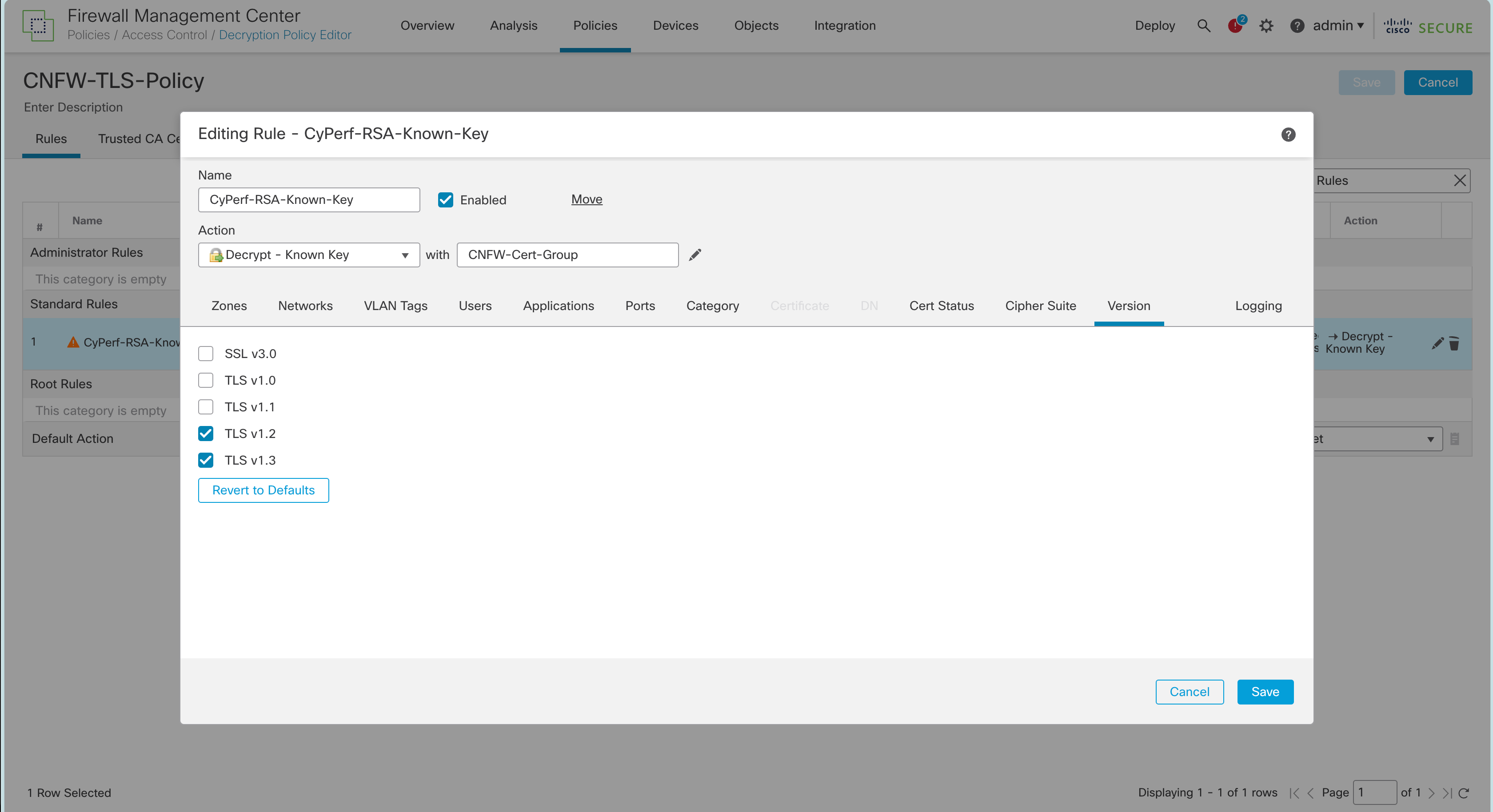
We also registered the Cisco Secure Firewall Threat Defense into the Cisco Secure Firewall Management Center (FMC). We enabled TLS 1.2 and 1.3 following Cisco’s instructions. This included updating from Snort v2 to Snort v3, which is required to enable TLS 1.3—as per Cisco: “You must be using Snort 3 to match TLS 1.3 connections.” See https://www.cisco.com/c/en/us/td/docs/security/firepower/730/fdm/fptd-fdm-config-guide-730/fptd-fdm-ssl-decryption.html for more details.


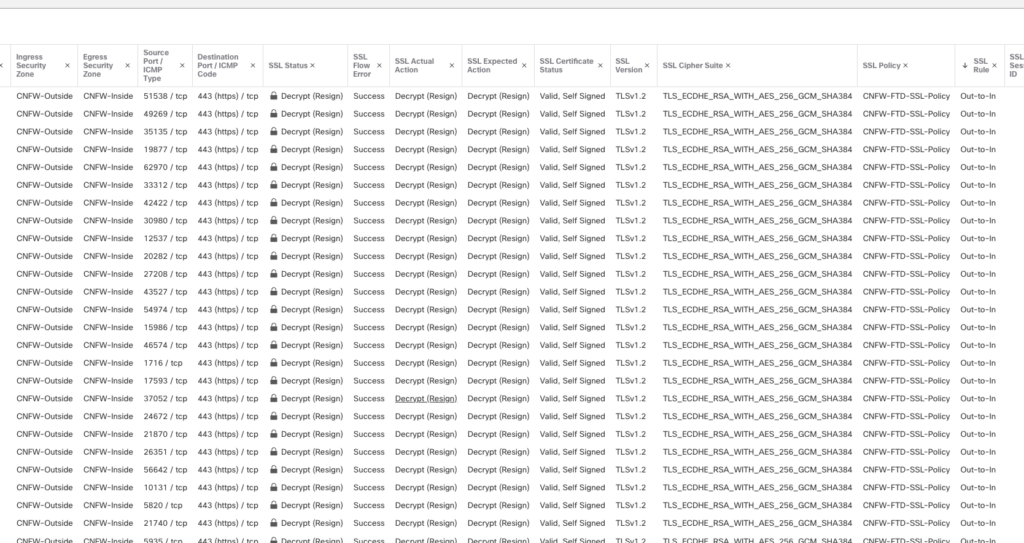
After deploying the firewall following their best practices, we were able to verify that TLS 1.2 was decrypting properly, as seen in this screenshot:

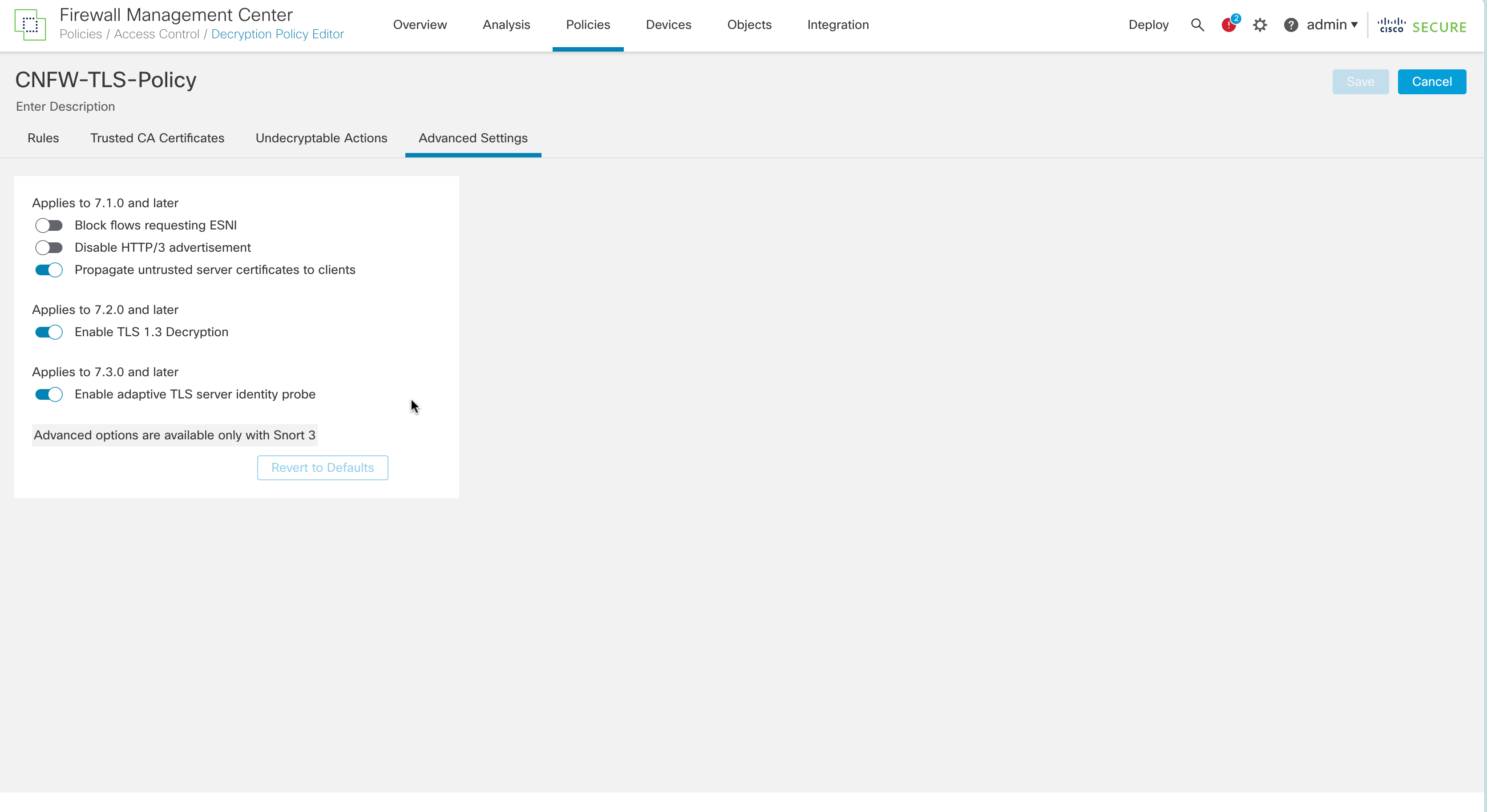
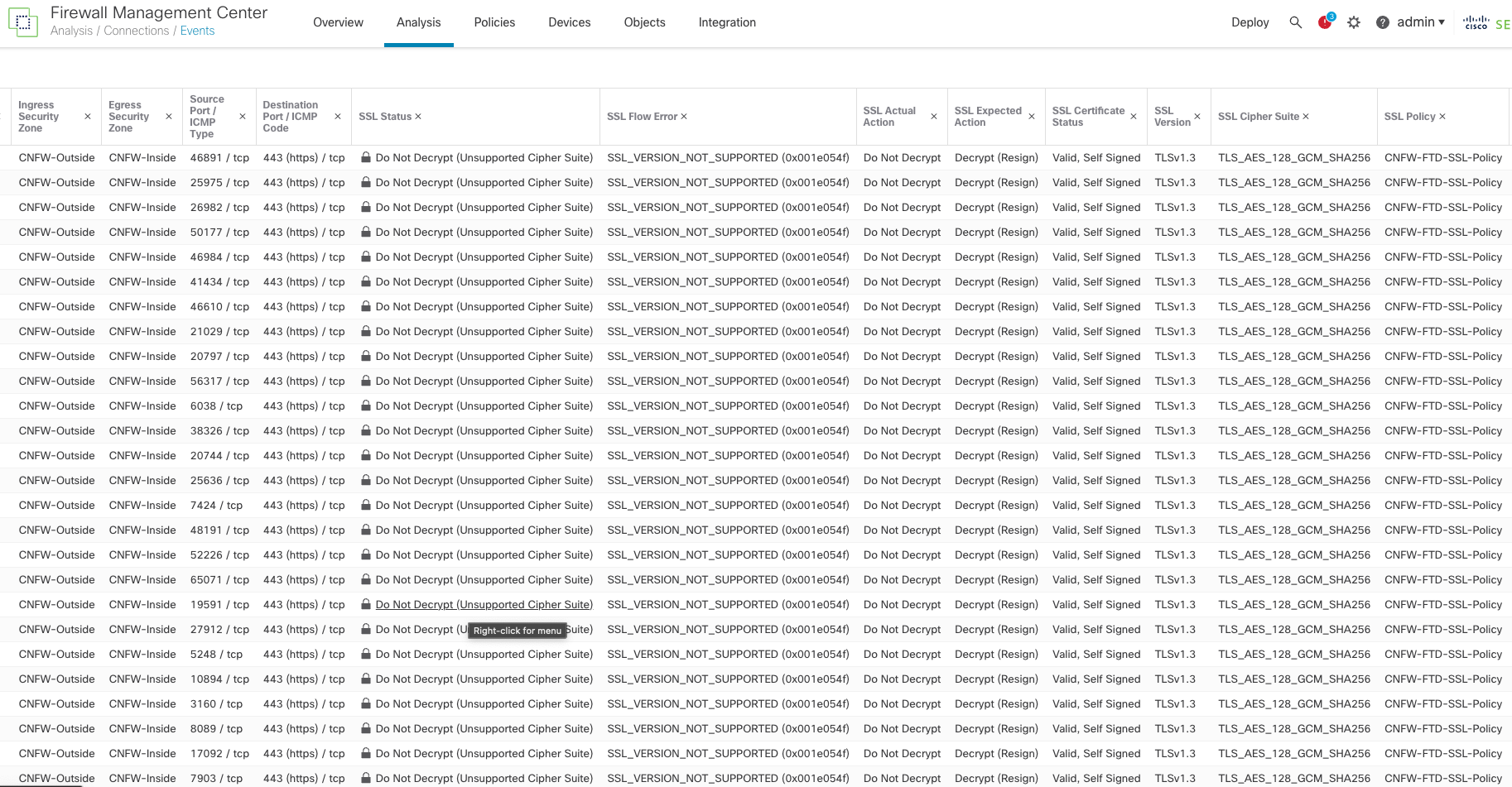
Even though we followed the instructions provided by Cisco to enable TLS 1.3, the Cisco Firewall failed to decrypt TLS 1.3 and the logs issued an “SSL_Version_Not_Supported” error, as seen in this screenshot:

Unless you look at the logs, the user interface does not indicate that TLS 1.3 is not being appropriately As shown in the above screenshots. you can check a box that is supposed to turn on TLS 1.3 support, but it does not turn it on. Moreover, while Cisco says TLS 1.3 is on, and when TLS 1.3 traffic is sent across the Cisco cloud firewall, the logs clearly state that the TLS/Cipher suites are not supported and do not decrypt the data. In addition, Cisco does not support the CHACHA20 cipher suites despite claiming otherwise.

Forcepoint NGFW

Follow their instructions; the product doesn’t require any special configuration.

Product page: https://aws.amazon.com/marketplace/pp/prodview-svzncd5l73lu2

Documentation: https://help.forcepoint.com/ngfw/en-us/7.0.4/index.html

Fortinet FortiGate-VM

Follow their instructions; the product doesn’t require any special configuration.

Product page: https://aws.amazon.com/marketplace/pp/prodview-wory773oau6wq

Documentation: https://docs.fortinet.com/document/fortigate/7.2.6/administration-guide/954635/getting-started

Juniper Networks vSRX

Follow their instructions; the product doesn’t require any special configuration.

Product page: https://aws.amazon.com/marketplace/pp/prodview-z7jcugjx442hw

Documentation: https://www.juniper.net/documentation/us/en/software/vsrx/vsrx-consolidated-deployment-guide/vsrx-consolidated-deployment-guide.pdf

Palo Alto Networks VM-Series Next-Generation Firewall w/ Advanced Threat Prevention

Follow their instructions; the product requires special configuration. See below.

Evasion defenses are not enabled by default. Please follow the instructions below. These are a combination of their best practices guide as well as additional instructions per the Palo Alto Engineers we worked with.

Product page: https://aws.amazon.com/marketplace/pp/prodview-mn63yjbq37n4c

Documentation: https://docs.paloaltonetworks.com/best-practices/security-policy-best-practices/security-policy-best-practices

Next, you will have to follow the detailed instructions as documented by Palo Alto Networks: https://docs.paloaltonetworks.com/pan-os/9-1/pan-os-admin/threat-prevention/best-practices-for-securing-your-network-from-layer-4-and-layer-7-evasions

After following those instructions, then issue the following commands in the command line interface (CLI).

To do this:

  • Enable SSH on the device.
  • Log in to the device with your admin credentials.
  • Run the following commands:

Set system setting ctd block-on-base64-decode-error enable
set system setting ctd block-on-bdat-chunk-decode-error enable
set system setting ctd block-on-chunk-decode-error enable
set system setting ctd block-on-qp-decode-error enable
set system setting ctd block-on-utf-decode-error enable
set system setting ctd block-on-uu-decode-error enable
set system setting ctd block-on-zip-decode-error enable

set deviceconfig setting session resource-limit-behavior bypass

request plugins vm_series set-cores dp-cores 3

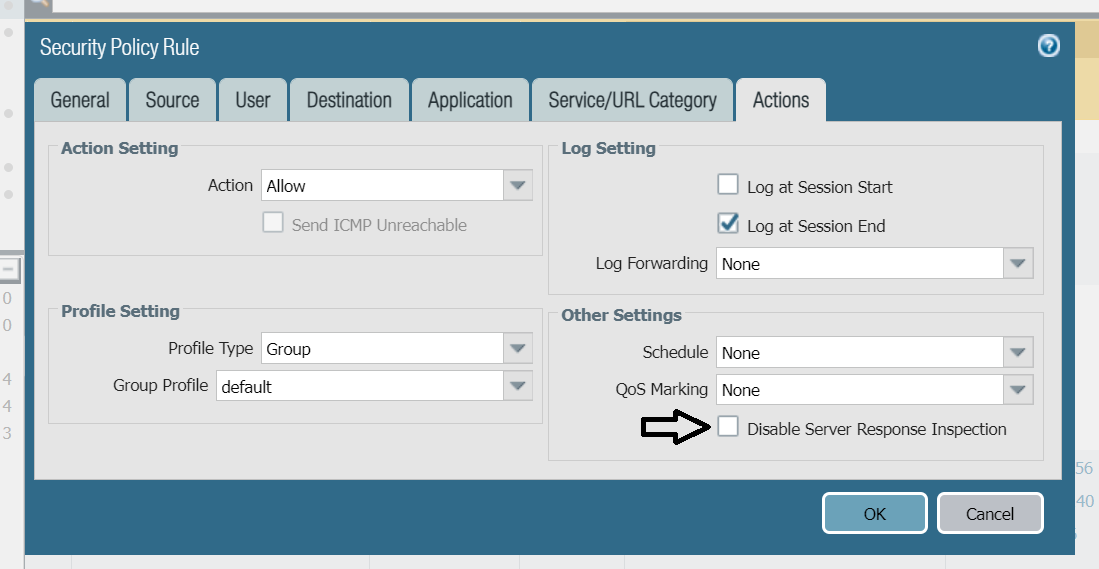
While the below configuration change will not improve your evasion protection, it may improve your performance. If you are worried about client-side attacks, do not make this change!

Disable Server Response Inspection (DSRI) – see screenshot below.

To Enable or disable DSRI:

  1. Go to Policies>Security>untrust-to-trust>Action.
  2. Check the “Other Settings “section for the DSRI option.
  3. Select the checkbox to enable.
  4. Unselect the checkbox to disable.

We have been informed that an upcoming version of the Palo Alto OS will enable these evasions by default.

Sophos Firewall

Follow their instructions; the product doesn’t require any special configuration.

Product page: https://aws.amazon.com/marketplace/pp/prodview-ga4qvij427bvw

Documentation: https://docs.sophos.com/nsg/sophos-firewall/20.0/help/en-us/webhelp/onlinehelp/index.html

Versa Networks NGFW

Follow their instructions; the product doesn’t require any special configuration.

Unlike the other products in this guide, Versa only offers a bring-your-own license (BOYL). This means products can be deployed using Versa Director (their central management system) or through EC2 on AWS.

Product page: https://aws.amazon.com/marketplace/pp/prodview-egtkta2usoxfa

Documentation: https://academy.versa-networks.com/versa-academy-library/

Documentation: https://docs.versa-networks.com

WatchGuard Firebox Cloud

Follow their instructions; the product doesn’t require any special configuration.

Product page: https://aws.amazon.com/marketplace/pp/prodview-5qg2dngtf3fgu

Documentation: https://www.watchguard.com/help/docs/help-center/en-US/Content/en-US/_intro/home.html

Navigating the Gap Between Vendor Claims and Real-World Performance in Cybersecurity

In the world of cybersecurity, the discrepancy between vendor promises and actual product performance in live environments is a stark reality that organizations must navigate. Performance metrics may dazzle in datasheets but frequently fall short in real-world applications. When all security features are engaged, actual throughput often diminishes significantly, and latency issues can cause a device to be relegated to a passive state where their blocking features are disabled.

This gap isn’t limited to performance metrics alone. When vendors claim protection against certain threats, it is important to ask for the details: What are the specific operating system, product, and engine versions required? What firmware version, software version, and configurations are necessary? It’s imperative to put these claims to the test to ensure the security product indeed defends against threats as promised. On numerous occasions CyberRatings has observed a failure in products to protect against specific attacks, despite vendor assurances. Relying solely on vendor claims can cultivate a dangerous illusion of security, potentially exposing them to heightened risk.

A well-structured test plan can reveal that lower performance levels might be perfectly adequate for certain network segments, potentially leading to significant cost savings. Without conducting relevant in-house tests, organizations risk being swayed into unnecessary overspending, acquiring devices with excessive performance capabilities or coverage that are not essential for their specific environment.

In situations where in-house testing is not feasible, it’s vital to prioritize products that have undergone rigorous evaluation by independent, security-focused third-party testing organizations for shortlisting. This approach provides at least a baseline assurance in the product selection process. Although allocating a budget for this additional step in the procurement process may pose challenges, it’s crucial for management to explicitly acknowledge and accept the risks associated with foregoing in-house testing.

In conclusion, the key takeaway for organizations navigating the cybersecurity landscape is clear: Vendor claims are a starting point, not a guarantee. Rigorous, real-world testing remains an indispensable step in ensuring that the chosen security solutions genuinely align with an organization’s specific needs and effectively safeguard against the ever-evolving array of cyber threats.

The Risks of Not Testing:

  1. False Sense of Security: Security solutions can create a deceptive safety net if you don’t know their limits. Without rigorous testing, weaknesses remain hidden, leaving critical systems vulnerable to both internal and external threats.
  2. Performance Pitfalls: A security product’s real-world performance can drastically differ from vendor claims. When deployed in a live network, issues like high latency and frequent false positives can result in active devices being redeployed in a passive state or having blocking disabled, significantly reducing their effectiveness.
  3. Security Shortcomings: Products may not work with your configuration or you may need to update software or firmware in order to gain protection.  Or there may be a bug in the cybersecurity product.
  4. Overspending: Without proper testing, organizations risk overspending on solutions that overpromise and underdeliver, draining valuable financial resources.

Crafting an Enterprise-Specific Testing Plan:

  1. Replicate Your Environment: Develop a test plan that mirrors your network’s specific conditions. This ensures that the product’s performance and effectiveness are evaluated in a relevant context.
  2. Ongoing Evaluation: Security threats evolve; so should your testing. Regularly assess your security products even post-deployment to adapt to new threats and maintain an effective security posture.
  3. Leverage External Expertise: When in-house resources are limited, external test labs offer invaluable expertise and tools for thorough product evaluation.