CyberRatings.org and NSS Labs Announce Follow-On Enterprise Firewall Results

Austin, TX – November 25, 2025 – CyberRatings.org (CyberRatings), the non-profit organization dedicated to providing confidence in cybersecurity products and services through independent testing, today announced Follow-On Test Results for the Fortinet FortiGate-200G and Palo Alto Networks PA-1410 Enterprise Firewalls.

Both products have improved their ratings from Caution to Recommended following submissions to NSS Labs to retest after developing new builds to address their earlier evasion resistance deficiencies published on November 5, 2025.

“Both Fortinet and Palo Alto Networks responded quickly and transparently to our original findings, issuing updates within days and requesting immediate retesting,” said Vikram Phatak, CEO of NSS Labs. “The speed at which these vendors addressed and resolved critical issues shows their commitment to their customers’ security.”

Fortinet Follow-On Results

During the initial test of Fortinet’s v7.6.4 build3596 with IPS v7.01154 (33.00064), NSS Labs was able to bypass protection using Layer 4 TCP evasions. Fortinet responded quickly to develop an updated IPS signature package. After retesting, NSS Labs confirmed that the update addressed all exploit evasion resistance deficiencies.

Exploit evasion resistance increased from 60% to 100%, elevating the overall Security Effectiveness from 79.24% to 99.24%. Organizations running IPS version v7.01154 (33.00064) or earlier should upgrade immediately to v7.01165 (33.00064) to ensure protection against evasion techniques as detailed in the November 5 publication.

Palo Alto Networks Follow-On Results

During the initial test of PAN-OS 11.2.8-c537, NSS Labs was able to bypass protection using Layer 3 IP and Layer 4 TCP evasions. Palo Alto Networks responded quickly to develop an updated PAN-OS firmware package (PAN-OS 11.2.10-c37) to ensure that the problem had been fixed. After retesting, NSS Labs confirmed that the updated firmware addressed all exploit evasion resistance deficiencies, providing substantial improvements in protection.

Exploit evasion resistance increased dramatically from 0% to 100%, elevating the overall Security Effectiveness from 46.37% to 96.07%.

NSS Labs notes that it is not unusual for vendors to submit pre-release software or firmware intended for imminent release, which NSS Labs requires to be scheduled for general availability within 90 days following a test. Palo Alto Networks confirmed that PAN-OS version 11.2.10-c37 was provided as a pre-release and will be designated as PAN-OS 11.2.10 upon reaching general availability.

Organizations running PAN-OS 11.2.8-c537 or earlier should immediately request PAN-OS 11.2.10 to ensure protection against evasion techniques as detailed in the November 5 publication.

Context and Vendor Accountability

These follow-on results reaffirm the importance of independent testing and vendor accountability. Both vendors’ prompt response demonstrates how transparency and rapid engineering benefit customers.

To accompany these follow-on reports, NSS Labs published a blog titled When Firewalls Fail Gracefully: Why Vendor Responsiveness Matters as Much as Security Effectiveness, highlighting the importance of transparency and quick remediation in cybersecurity engineering.

Testing Methodology

The follow-on tests were conducted using the same methodology and datasets employed in the original Q4 2025 Enterprise Firewall Comparative Report, which evaluated seven leading products under real-world conditions. The updated results now place Fortinet and Palo Alto Networks in the Recommended category alongside Check Point, Juniper Networks, and Versa Networks.

Tests were conducted by NSS Labs developed technologies and Keysight’s CyPerf tool to evaluate security, performance, TLS functionality, and stability. The updated test reports are available at no cost on the CyberRatings.org website.

SDxCentral: SSE protection found uneven across major vendors

Researchers reported major disparity in security effectiveness of security service edge (SSE) protection across major vendors.

Non-profit cyberratings.org/ (CyberRatings) found security effectiveness ranged from less than 3% to 100% in its testing of vendor products, with only Fortinet, Palo Alto Networks, Versa Networks, and Zscaler earning a “recommended” rating.

In contrast, SSE products from Cisco, Cloudflare, and Skyhigh were tagged with a “caution” label, indicating “below-average” security effectiveness with the recommendation that end users “should consider seeking other solutions.” The ratings were put down due to “failures in critical tests.”

Read the full article here.

CyberRatings.org Test Results Reveal Critical Failures in SSE

Austin, TX – July 16, 2025 – CyberRatings.org (CyberRatings), the non-profit organization dedicated to providing insight into the capabilities of cybersecurity products and services through independent testing, today announced the comparative results of its latest Security Service Edge (SSE) evaluation. The findings expose a striking disparity in product performance: Security Effectiveness ranged from 2.95% to 100%, underscoring just how uneven SSE protection remains across vendors.

Only Fortinet, Palo Alto Networks, Versa Networks, and Zscaler earned a Recommended rating, while products from Cisco, Cloudflare, and Skyhigh were rated Caution due to failures in critical tests.

Despite meeting our inclusion criteria and high market interest, we were unable to include Cato Networks and Netskope in this test. Netskope’s high entry level licensing cost and their lack of responsiveness to our inquiries to purchase their product rendered it inaccessible. Cato was explicit in their refusal to engage with us or allow us to procure licensing for any form of independent third-party validation.

“With cloud-delivered products rapidly evolving through continuous integration and deployment, customers have little visibility into what changes under the hood,” said Vikram Phatak, CEO of CyberRatings.org. “Only by conducting regular independent testing can enterprises ensure they’re not left vulnerable to silent failures that could go unnoticed for months.”

Of all the SSE test criteria, blocking evasions had the most impact on security effectiveness. Evasion techniques are used by threat actors to disguise or modify attacks, so they slip past defenses. While most products excelled at blocking known malware and exploits, three failed to stop evasions — exposing organizations to entire classes of undetected attacks.

These independent tests uniquely stress real-world evasion techniques that standard evaluations often overlook — the techniques cybercriminals rely on to bypass security measures.

The SSE evaluation was designed to reflect modern, adversarial conditions and covered:

  • Malware: 6,184 malware samples in active use by global threat actors.
  • Exploits: 205 exploits of known vulnerabilities.
  • Evasions: 1,154 evasions spanning 37 categories of techniques.
  • False Positives: 1,514 legitimate files and applications, verifying security measures do not impact users and operations.
  • TLS/SSL: Encrypted attacks using cipher suites that represent ~97% of real-world HTTPS traffic.

Security Service Edge is inherently complex — a multi-layered technology stacked atop ever-changing cloud environments. Customers typically have minimal visibility into how these systems operate and testing them independently is challenging. This double-layered opacity makes third-party validation essential to diagnose performance issues, fine-tune policy enforcement, and ensure real security outcomes. CyberRatings strongly urges organizations to adopt periodic or ongoing third-party testing to ensure consistent protection and compliance.

NSS Labs is the Official Testing Partner of CyberRatings. Keysight’s CyPerf tool was used for performance and TLS/SSL functionality, and TeraPackets Threat Replayer tool was used for exploit replay validation.

Futuriom: Cloud Firewalls Have Gaping Holes

In the release of remarkable firewall test results today, independent nonprofit testing firm CyberRatings.org revealed wild variability in network and cloud firewall efficacy, with special concerns about the firewall instances running in the major public clouds, which seemed not to work very well at all.

In the release of the CyberRatings Q1 2025 Comparative Test Report on Cloud Network Firewalls (CNFWs), many traditional firewalls performed quite well with efficacy ranging at almost 100%. Third-party firewalls from Check Point, Fortinet, Juniper Networks, Palo Alto Networks, and Versa Networks demonstrated the highest security effectiveness blocking exploits and evasion tactics. Results ranged from 99.61% to 100%.

But move into the public cloud, and you get a different story. Some native firewalls from Amazon Web Services (AWS), Google Cloud Platform (GCP), and Microsoft Azure received a 0% Security Effectiveness score as they allowed attacks to bypass existing defenses. In addition, Cisco’s Secure Firewall Defense didn’t receive high ratings, with a 54.5% effectiveness rating and the highest costs per bit of traffic in the bunch.

Read the full article here.

CyberRatings.org Publishes Test Results on Cloud Network Firewalls

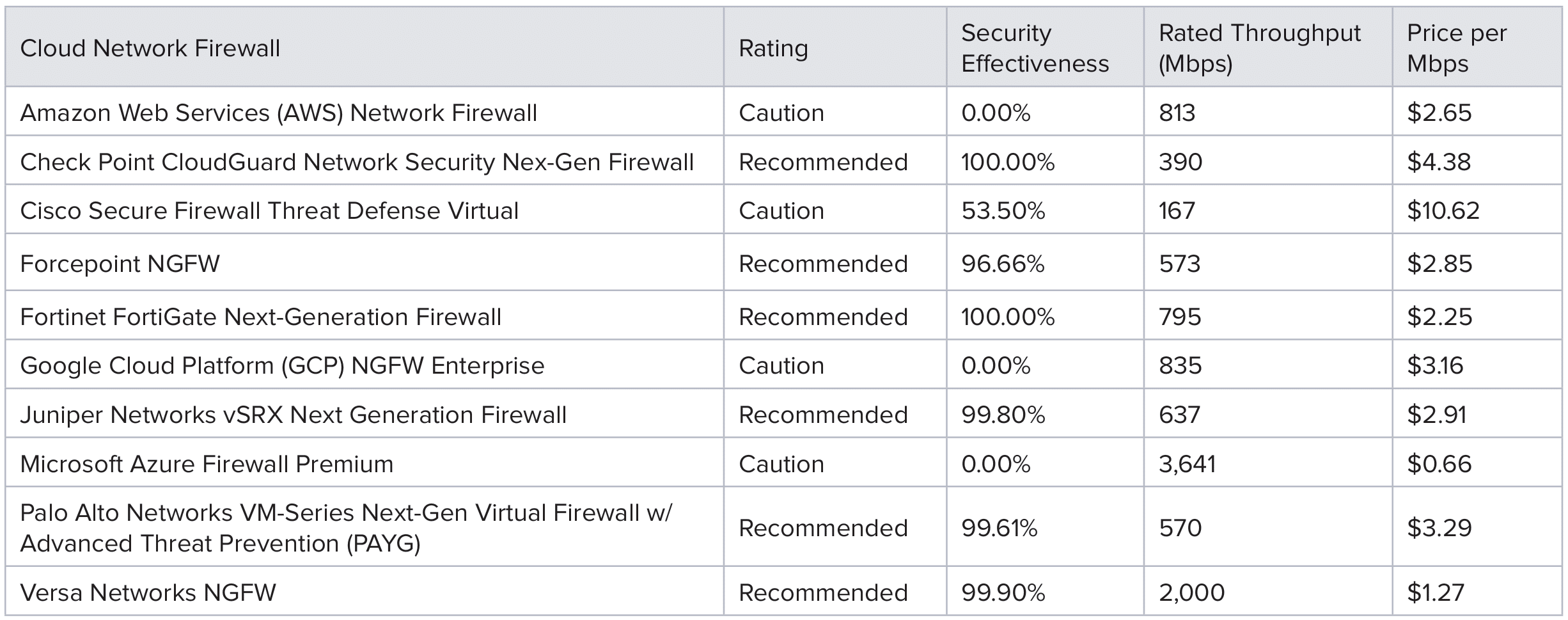
Austin, TX – April 2, 2025 – CyberRatings.org (CyberRatings), the non-profit entity dedicated to providing confidence in cybersecurity product efficacy, today released its Q1 2025 Comparative Test Report on Cloud Network Firewalls (CNFW), along with separate, in-depth reports for each of the ten cloud firewall solutions tested. Security effectiveness results ranged from 0% to 100%.

Key Findings:

  • Third-party firewalls from Check Point, Fortinet, Juniper Networks, Palo Alto Networks, and Versa Networks demonstrated the highest security effectiveness blocking exploits and evasion tactics. Results ranged from 99.61% to 100%.
  • Native cloud firewalls from Amazon Web Services (AWS), Google Cloud Platform (GCP), and Microsoft Azure offer a convenient alternative, but all received 0% Security Effectiveness as they allowed attacks to bypass existing defenses.
  • Google Cloud Platform’s Next Generation Firewall (NGFW) service leverages Palo Alto Networks technology. We attribute the differences in security effectiveness and performance results between the two platforms to each provider independently selecting and deploying different software versions based on their own criteria.
  • A total of six firewall solutions were Recommended and four received Caution ratings.

In the Cloud Service Provider Native Firewall test from November 2024 only 522 exploits were used in the Part 1 “Mini-Test”, but not evasions. For this round of testing, a greater number of exploits were deployed, and evasions were introduced to the test samples:

  • False Positives: 2,760 samples from various business-critical files and applications, ensuring security measures did not disrupt legitimate traffic.
  • Exploits: 2,028 attack samples from widely exploited vulnerabilities in enterprise environments.
  • Evasion Techniques: 2,500 attacks spanning 27 evasion techniques tested across multiple network layers to bypass firewall defenses.
  • Performance Metrics: 46 different stress and capacity tests under diverse workloads.
  • Stability & Reliability: Seven extended tests simulating prolonged real-world attack and operational scenarios.

CyberRatings evaluated firewall security by testing for evasion detection at three separate layers of the Open Systems Interconnection (OSI) model, specifically Layers 3, 4, and 7. Missing lower-layer evasions had the greatest impact on the overall score because these layers form the foundation of firewall security at the fundamental networking level, and when these lower layers are compromised, the firewall’s primary protective function is undermined. Points were deducted based on the firewall’s ability—or inability—to detect evasions:

  • A missed evasion from the Layer 3 level resulted in a 50% deduction per category, up to a potential category maximum reduction of 100%.
  • Missing a Layer 4 evasion led to a 20% deduction per category, up to a potential category maximum reduction of 60%.
  • A miss at Layer 7 incurred only a 1% deduction per category, up to a potential category maximum reduction of 10%.

Layers 3 and 4 evasions are particularly concerning since all modern applications rely on IP and TCP. Vulnerabilities at these layers can be exploited across a wide range of systems—from cloud services to enterprise applications.

“Until cloud service provider native firewalls provide better protection, customers should be looking to third parties for their cloud security needs,” said Vikram Phatak, CEO of CyberRatings.org. “Traditional third-party security vendors have demonstrated that they bring significant value to customers.”

Below is a summary of the Ratings:

The cloud firewalls were tested using Keysight’s CyPerf v5.0 software testing platform in addition to CyberRatings’ in-house developed test tools. Enterprises can easily perform similar testing with a 2-week free trial from Keysight. Further details of the CyPerf strike library can be found here: https://www.keysight.com/us/en/products/network-test/cloud-test/cyperf.html

CyberRatings.org Announces Test Results for VMware VeloCloud SD-WAN by Broadcom

Austin, TX – October 22, 2024 – CyberRatings.org (CyberRatings), the non-profit entity dedicated to providing confidence in cybersecurity products and services through its research and testing programs, has completed an independent test of VMware VeloCloud SD-WAN by Broadcom.

This is the third Software-Defined Wide Area Network (SD-WAN) test to be announced by CyberRatings this year. In August, CyberRatings published the SD-WAN test results for Forcepoint and Versa Networks.

SD-WAN technology helps organizations achieve operational savings by enabling remote configuration of new locations rather than requiring engineers to be onsite. Many vendors offer zero-touch provisioning (ZTP), where onsite engineering expertise is optional, other than the ability to connect a device to the appropriate internal and external links and power up the device. Once online, the device will call “home” to either headquarters or a cloud configuration service to download the operational configuration.

We tested five devices, a high availability pair at corporate headquarters and then three remote locations: 1) a regional office, 2) a remote branch office and 3) a retail storefront. Each use case was tested for traffic content, throughput, transport, and impairments to see how the SD-WAN performed. A “AAA” score was based on Management, Routing & Access Control, Stability & Reliability, and the Mean Opinion Score (MOS).

Maximum MOS scores for Voice Over IP (VoIP/audio) are 4.41 and 4.53 for video. The VMware VeloCloud SD-WAN solution achieved a 4.39 MOS score for audio and a 4.39 score for video.

“VMware’s SD-WAN is a full-featured solution that proved to be highly efficient,” said Vikram Phatak, CEO of CyberRatings.org. “Enterprises should have this product on their shortlist.”

Key Findings for VMware VeloCloud SD-WAN by Broadcom:

  • Management and Deployment: Effectively supported Zero Touch Provisioning (ZTP), facilitating remote configuration and deployment across multiple branches.
  • Routing and Policy Enforcement: Successfully enforced simple and complex network policies, including site-to-site VPNs and direct internet access, ensuring secure and efficient traffic routing.
  • Quality of Experience: Delivered mostly consistent MOS for audio and video, even when subjected to various WAN impairments such as packet loss, delay, and reordering.
  • Capacity and Performance: Handled traffic loads well and achieved high throughput with minimal latency.
  • Stability and Reliability: Maintained operational stability under extended adverse conditions and high traffic loads preserving state and ensuring the continued passage of traffic.

Keysight provided its CyPerf, BreakingPoint and Network Emulator tools to test performance, TLS functionality, stability and impairment.

The in-depth test report with scores for Management, Routing & Access Control, Stability & Reliability, and the Mean Opinion Score (MOS) are available at CyberRatings.org.

CyberRatings.org Announces SD-WAN Test Results for Forcepoint and Versa Networks.

Austin, TX – August 26, 2024 – CyberRatings.org (CyberRatings), the non-profit entity dedicated to providing confidence in cybersecurity products and services through its research and testing programs, has completed an independent test of two market-leading Software-Defined Wide Area Network (SD-WAN) products: Forcepoint FlexEdge Secure SD-WAN and Versa Networks Secure SD-WAN.

SD-WAN technology helps organizations achieve operational savings by enabling remote configuration of new locations rather than requiring engineers to be onsite. Many vendors offer zero-touch provisioning (ZTP), where onsite engineering expertise is optional, other than the ability to connect a device to the appropriate internal and external links and power up the device. Once online, the device will call “home” to either headquarters or a cloud configuration service to download the operational configuration.

The testing combination of devices consisted of a high availability pair at the head-end, corporate headquarters representing Branch 1, a regional office (Branch 2), and a retail outlet (Branch 3). Each use case was tested for traffic content, throughput, transport, and impairments to see how the SD-WAN performed. A “AAA” score was based on Management, Routing & Access Control, Stability & Reliability, and the Mean Opinion Score (MOS).

Maximum MOS scores for Voice Over IP (VoIP/audio) are 4.41 and 4.53 for video. Forcepoint achieved a 4.40 MOS score for audio and a 4.48 score for video. Versa’s MOS score for audio was 4.41 and 4.37 for video.

“These are mature, full-featured SD-WAN products that proved to be highly efficient,” said Vikram Phatak, CEO of CyberRatings.org. “Enterprises should have them on their shortlist.”

Key Findings for both the Forcepoint and Versa Networks products:

  • Management and Deployment: Effectively supported Zero Touch Provisioning (ZTP), facilitating remote configuration and deployment across multiple branches.
  • Routing and Policy Enforcement: Successfully enforced simple and complex network policies, including site-to-site VPNs and direct internet access, ensuring secure and efficient traffic routing.
  • Quality of Experience: Delivered consistent MOS for audio and video, even when subjected to various WAN impairments such as packet loss, delay, and reordering.
  • Capacity and Performance: Handled traffic loads well and achieved high throughput with minimal latency.
  • Stability and Reliability: Maintained operational stability under extended adverse conditions and high traffic loads preserving state and ensuring the continued passage of traffic.

Keysight provided its CyPerf, BreakingPoint and Network Emulator tools to test performance, TLS functionality, stability and impairment.

The in-depth Forcepoint and Versa Networks SD-WAN test reports with scores for Management, Routing & Access Control, Stability & Reliability, and the Mean Opinion Score (MOS) are available at CyberRatings.org.

Best Practices for Enterprise Firewall Deployment in 2024

As previously announced, the security industry is working towards a secure-by-default configuration.

This is still an ongoing process; however, we already see vendors making improvements from when we published the cloud network firewall group test. In that test, we found that not all products were secure by default. Therefore, we documented the changes we made and published them. We are doing the same for this group test.

Last year, the Cybersecurity & Infrastructure Security Agency (CISA), along with ten U.S. and international partners, published guidelines for their “Secure by Design, Secure by Default” principle. In their April 2023 publication, they stated the following:

“Secure-by-Default” means products are resilient against prevalent exploitation techniques out of the box without additional charge. These products protect against the most prevalent threats and vulnerabilities without end-users having to take additional steps to secure them. Secure-by-Default products are designed to make customers acutely aware that when they deviate from safe defaults, they are increasing the likelihood of compromise unless they implement additional compensating controls.

This guide should complement what the vendors already provide to their customers. Please refer to the links below for the best practices and guides for each vendor we tested. We have also included extra information for one vendor: Cisco.

The following steps were taken for each firewall:

  • Deploy the firewall in our lab in Austin, Texas (we are using Fortinet for this example).
  • Connect the interfaces required for the topology. This information can be found in each vendor guide.
  • Register the device to the centralized management system where needed. For our test, we only used centralized management for Cisco and Versa Networks. For Cisco, it is required to get some functionality working; more on this below. For Versa Networks, it’s both recommended and needed from a licensing perspective. This is information that is found in each vendor guide.
  • Validation of licenses, which, in turn, enable software updates, threat updates, etc. This information is found in each vendor guide.
  • Define access policies:
    • Trust to untrust
    • Untrust to trust
  • Define IPS policies:
    • Enable threat signatures, advanced protection, cloud lookup, etc. Each product handles this differently, but this information is in their guides.
  • Upload the required server certs, keys, and CA certs if necessary. This information is available in each vendor guide.
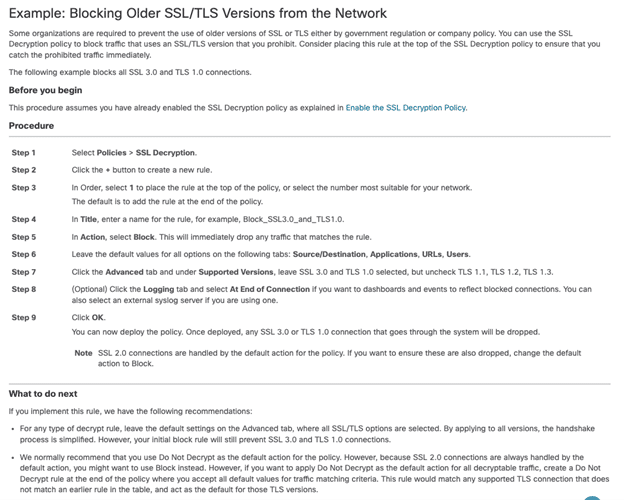
  • Define TLS decryption policies for versions 1.2 and 1.3. Configure them to decrypt all traffic. We make a few exceptions to test if the product can bypass decryption based on specific IP addresses or domain names. If something cannot be decrypted or is using an older TLS/SSL version or an insecure cipher, then the product is set to block.
  • Link IPS and TLS policies to the overall access policy.
  • Validate configuration:
    • Make sure you can pass traffic.
    • Make sure you can block attacks by sending something malicious. Tune out false positives where possible. If we couldn’t do so without disabling security or if it was practically impossible, we listed the false positive rate in the test report. Please refer to individual test reports for more details.

For each firewall listed below, we have included a link to best practices and additional information.

Firewalls Tested:


Check Point Quantum Force 19200 plus

https://www.checkpoint.com/downloads/products/quantum-force-19200-datasheet.pdf

Firmware: R81.20 Jumbo Hotfix Take 45
IPS Version: 635242922
Configuration: 2 x 40G – 1 port-pairs

Follow their instructions; the product doesn’t require any special configuration.

Documentation: https://support.checkpoint.com


Cisco Firepower 2130

https://www.cisco.com/c/en/us/products/collateral/security/firepower-2100-series/datasheet-c78-742473.html

Firmware: Threat Defense v7.3.1 (build 19)
IPS Version: 384
Configuration: 4 x 10G – 2 port-pairs

Follow their instructions; the product requires special configuration; see below.

Documentation: https://www.cisco.com/c/en/us/support/security/firepower-ngfw/products-installation-and-configuration-guides-list.html

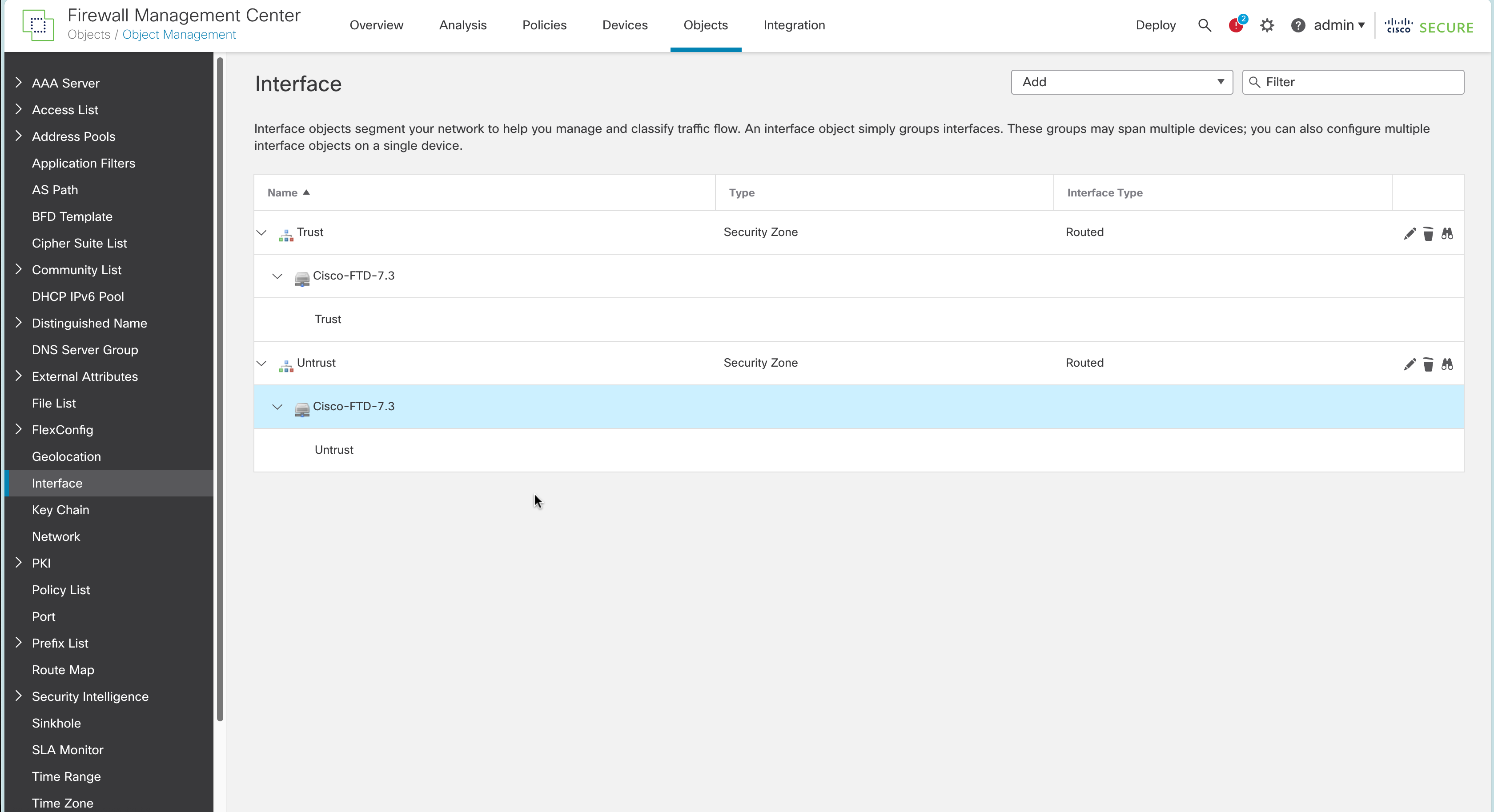
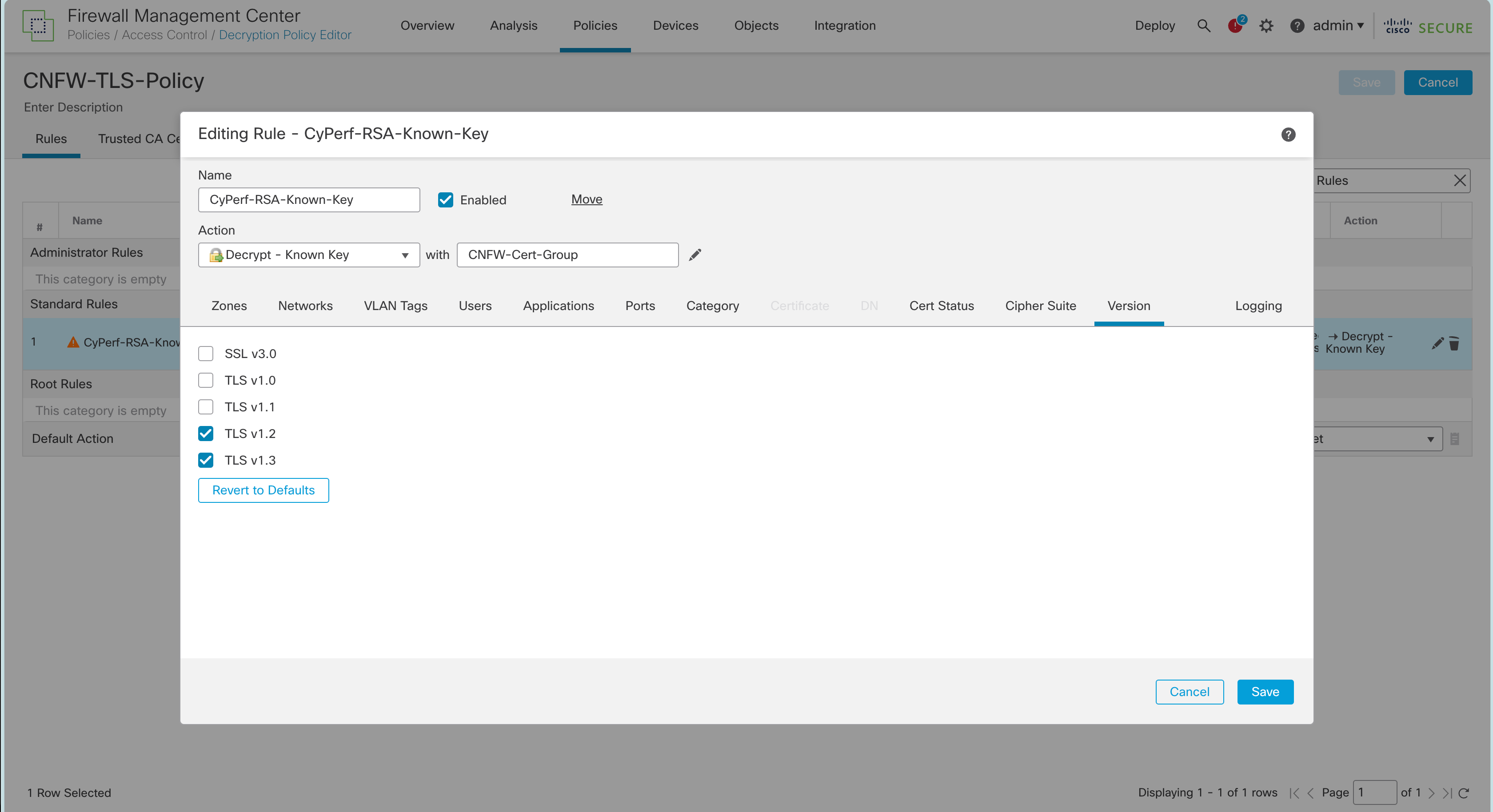
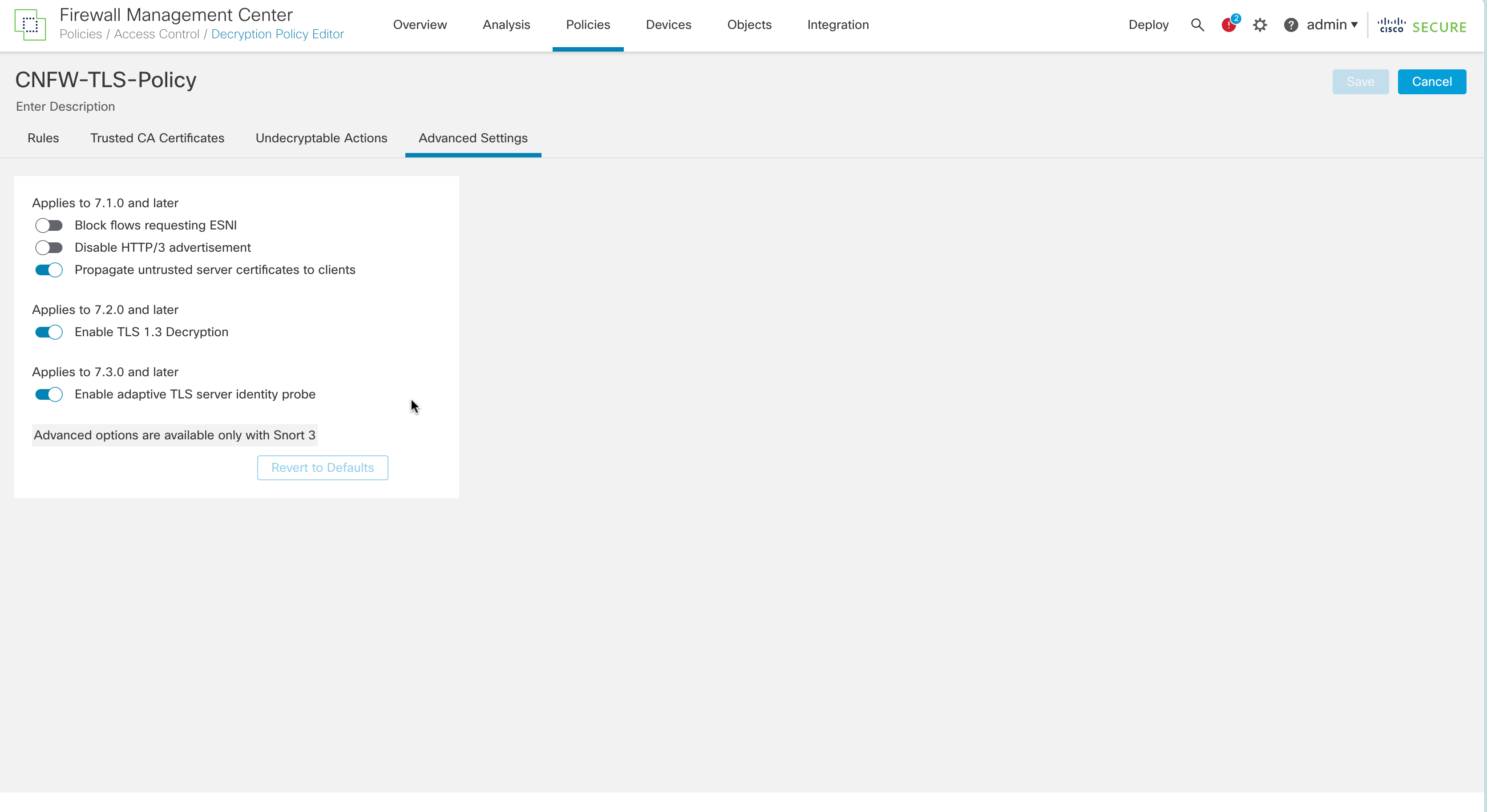
We also registered the Cisco Secure Firewall Threat Defense into the Cisco Secure Firewall Management Center (FMC). We enabled TLS 1.2 and 1.3 following Cisco’s instructions. This included updating from Snort v2 to Snort v3, which is required to enable TLS 1.3—as per Cisco: “You must be using Snort 3 to match TLS 1.3 connections.” See https://www.cisco.com/c/en/us/td/docs/security/firepower/730/fdm/fptd-fdm-config-guide-730/fptd-fdm-ssl-decryption.html for more details. This link also provides information about how to make TLS 1.2 and TLS 1.3 work, while also blocking other SSL/TLS version.

Note: Cisco does not support the CHACHA20 cipher suites despite claiming otherwise.

The following screenshot shows the instructions required for achieving our test’s use case.


Forcepoint 3410 NGFW

https://www.forcepoint.com/sites/default/files/resources/datasheets/datasheet-forcepoint-ngfw-3400-series-appliance-en_0.pdf

Firmware: 7.1.1 build 29059
IPS Version: 1707
Configuration: 2 x 40G – 1 port-pairs

Follow their instructions; the product doesn’t require any special configuration.

Note: From version 7.1, Forcepoint Next Generation Firewall is rebranded to Forcepoint FlexEdge Secure SD-WAN.

Documentation: https://support.forcepoint.com/s/article/FlexEdge-Secure-SD-WAN


Fortinet FortiGate-900G

https://www.fortinet.com/content/dam/fortinet/assets/data-sheets/fortigate-900g-series.pdf

Firmware: v7.4.4 GA
IPS Version: 27.00783
Configuration: 4 x 10G – 2 port-pairs

Follow their instructions; the product doesn’t require any special configuration.

Documentation: https://docs.fortinet.com/document/fortigate/7.4.4/administration-guide/954635/getting-started


Juniper Networks SRX4600

https://www.juniper.net/us/en/products/security/srx-series/srx4600-firewall-datasheet.html

Firmware: JUNOS 22.4X3.1 srx4600
IPS Version: 3701
Configuration: 2 x 40G – 2 port-pairs

Follow their instructions; the product doesn’t require any special configuration.

Documentation: https://www.juniper.net/documentation/product/us/en/srx4600/junos-os/


Palo Alto Networks PA-450

https://docs.paloaltonetworks.com/hardware/pa-400-hardware-reference/pa-400-firewall-specifications

Firmware: 11.1.1
IPS Version: Threat Version: 2024-05-14 (8849-8746)

AntiVirus Version: 2024-05-14 (4818-5336)

Configuration: 4 x 1G – 2 port-pairs

Follow their instructions; the product doesn’t require any special configuration.

Evasion defenses are now enabled by default, using their latest update. To verify this is the case, please follow the instructions below.

Documentation: https://docs.paloaltonetworks.com/best-practices

Next, you will have to follow the detailed instructions as documented by Palo Alto Networks: https://docs.paloaltonetworks.com/advanced-threat-prevention/administration/threat-prevention/best-practices-for-securing-your-network-from-layer-4-and-layer-7-evasions

After following those instructions, issue the commands in the command line interface (CLI).

To do this:

  • You will have to enable SSH on the device.
  • Then, log in to the device with your admin credentials.
  • Then, run the following commands:

Set system setting ctd block-on-base64-decode-error enable
set system setting ctd block-on-bdat-chunk-decode-error enable
set system setting ctd block-on-chunk-decode-error enable
set system setting ctd block-on-qp-decode-error enable
set system setting ctd block-on-utf-decode-error enable
set system setting ctd block-on-uu-decode-error enable
set system setting ctd block-on-zip-decode-error enable

set deviceconfig setting session resource-limit-behavior bypass


Sangfor NGAF 5300

https://www.sangfor.com/sites/default/files/2022-06/NGAF_DS_P_NGAF53-Datasheet_20220531.pdf

Firmware AF 8.0.85.1029 Build 20240423
IPS Version 2024-04-23 (Vulnerability Database)
Configuration 2 x 10G – 1 port-pairs

Follow their instructions; the product doesn’t require any special configuration.

Documentation: https://community.sangfor.com/plugin.php?id=sangfor_databases%3Aindex#?Product=NGAF&Document=Configuration%20Guide&Language=English


Versa Networks CSG5000

https://versa-networks.com/documents/datasheets/versa-csg5000-series.pdf

Firmware versa-flexvnf-20240405-041659-5186a33-22.1.4-B
IPS Version 6446
Configuration 5 x 10G – 5 port-pairs (limited to 40G)

Follow their instructions; the product doesn’t require any special configuration.

Documentation: https://academy.versa-networks.com/versa-academy-library/

Documentation: https://docs.versa-networks.com

2024 Best Practices for Cloud Network Firewall Deployment

The security industry is working towards a secure by default configuration. However, when setting up products for the 2024 Cloud Network Firewall group test, we found that not all products are secure by default. We, therefore, documented the changes we made and are publishing them in this guide.

Last year, the Cybersecurity & Infrastructure Security Agency (CISA), along with ten U.S. and international partners, published guidelines for their “Secure by Design, Secure by Default” principle. In their April 2023 publication, they stated the following:

“Secure-by-Default” means products are resilient against prevalent exploitation techniques out of the box without additional charge. These products protect against the most prevalent threats and vulnerabilities without end-users having to take additional steps to secure them. Secure-by-Default products are designed to make customers acutely aware that when they deviate from safe defaults, they are increasing the likelihood of compromise unless they implement additional compensating controls.

This guide should be used as a supplement to what the vendors already make available to their customers. Please see the links below to the best practices and guides for each product we tested. We have also provided additional information for three products: Cisco Secure Firewall Threat Defense Virtual, Palo Alto Networks VM-Series, and Amazon Web Services (AWS) Network Firewall.

Cloud Network Firewall Test Topology

The following steps were taken for each firewall:

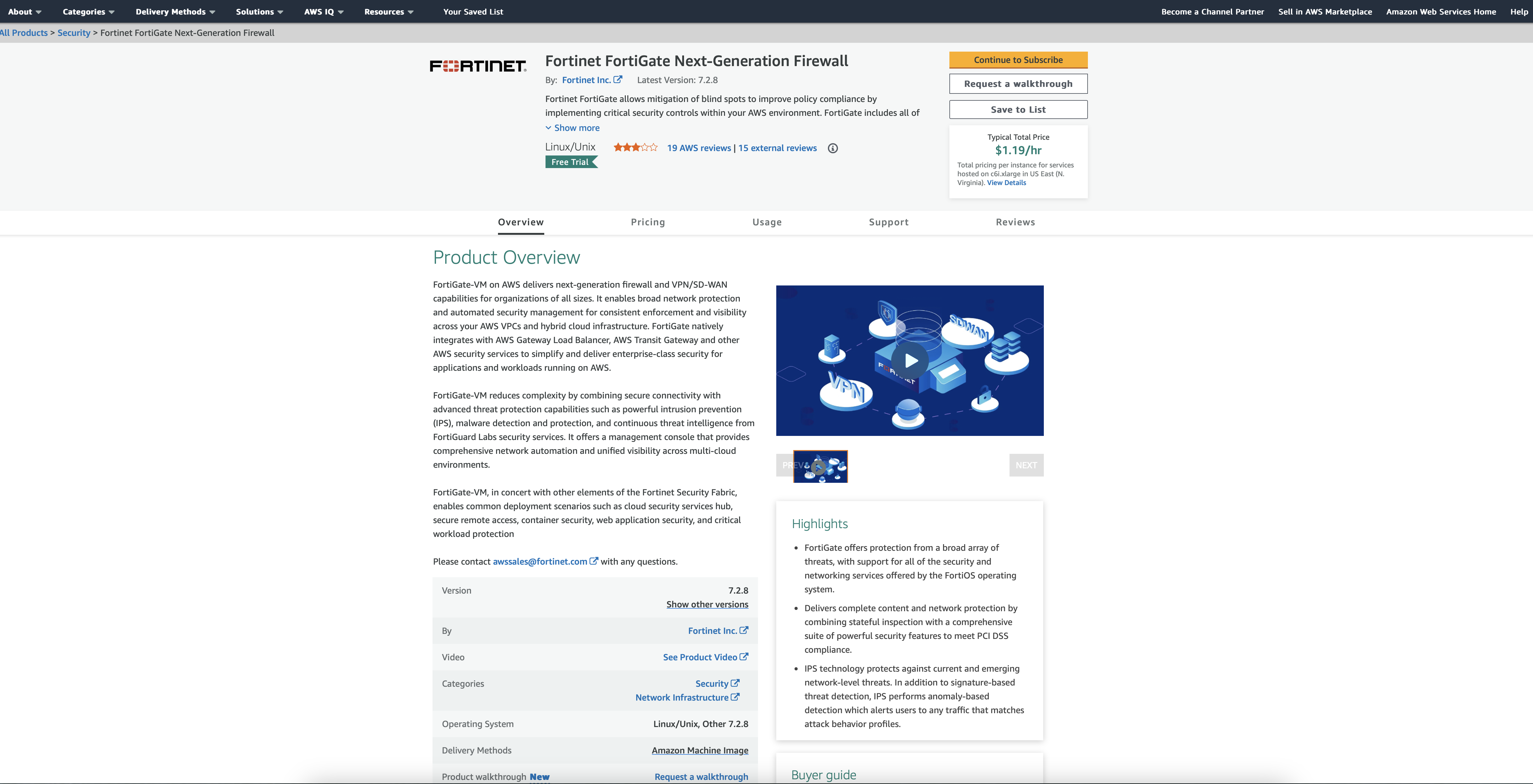
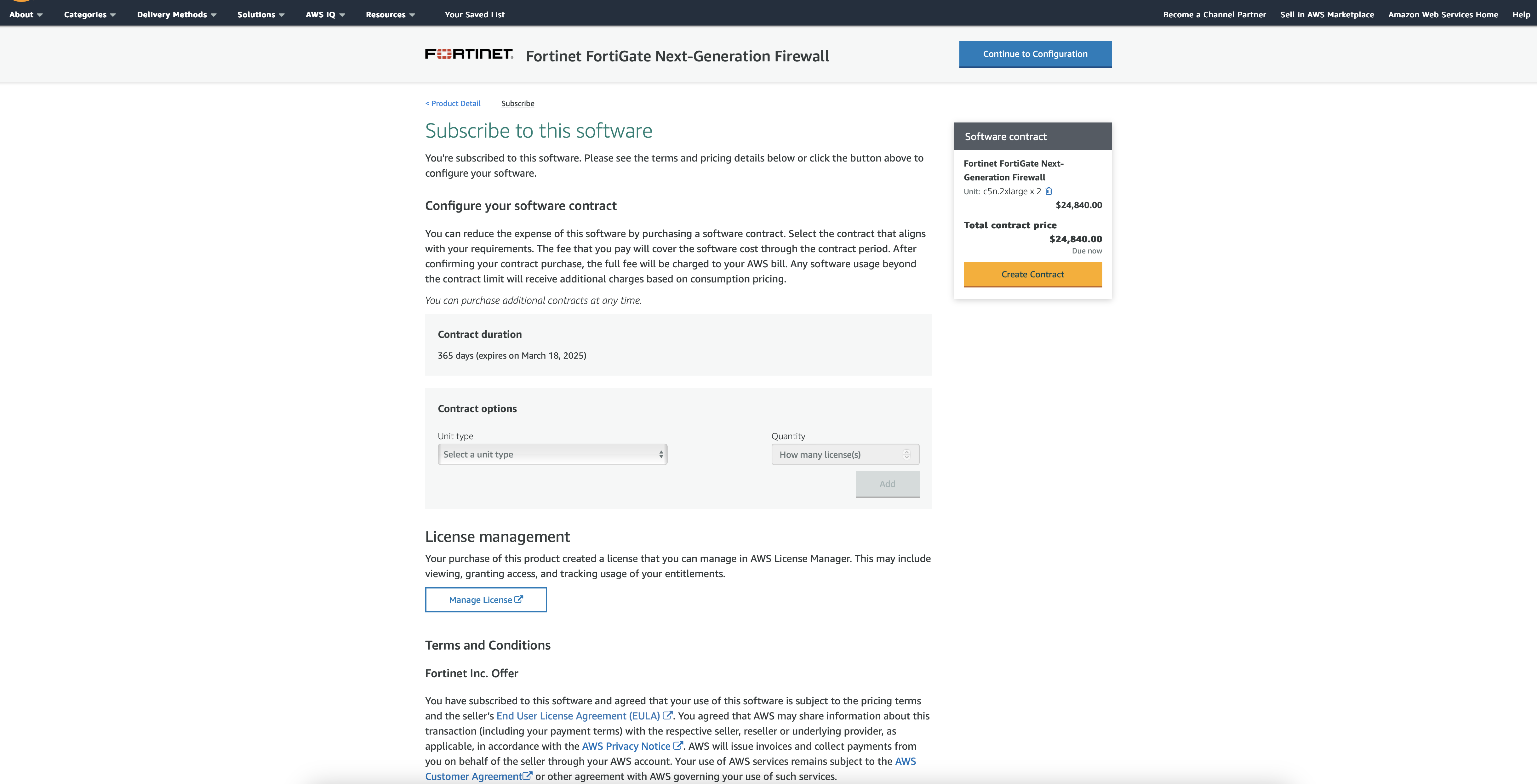
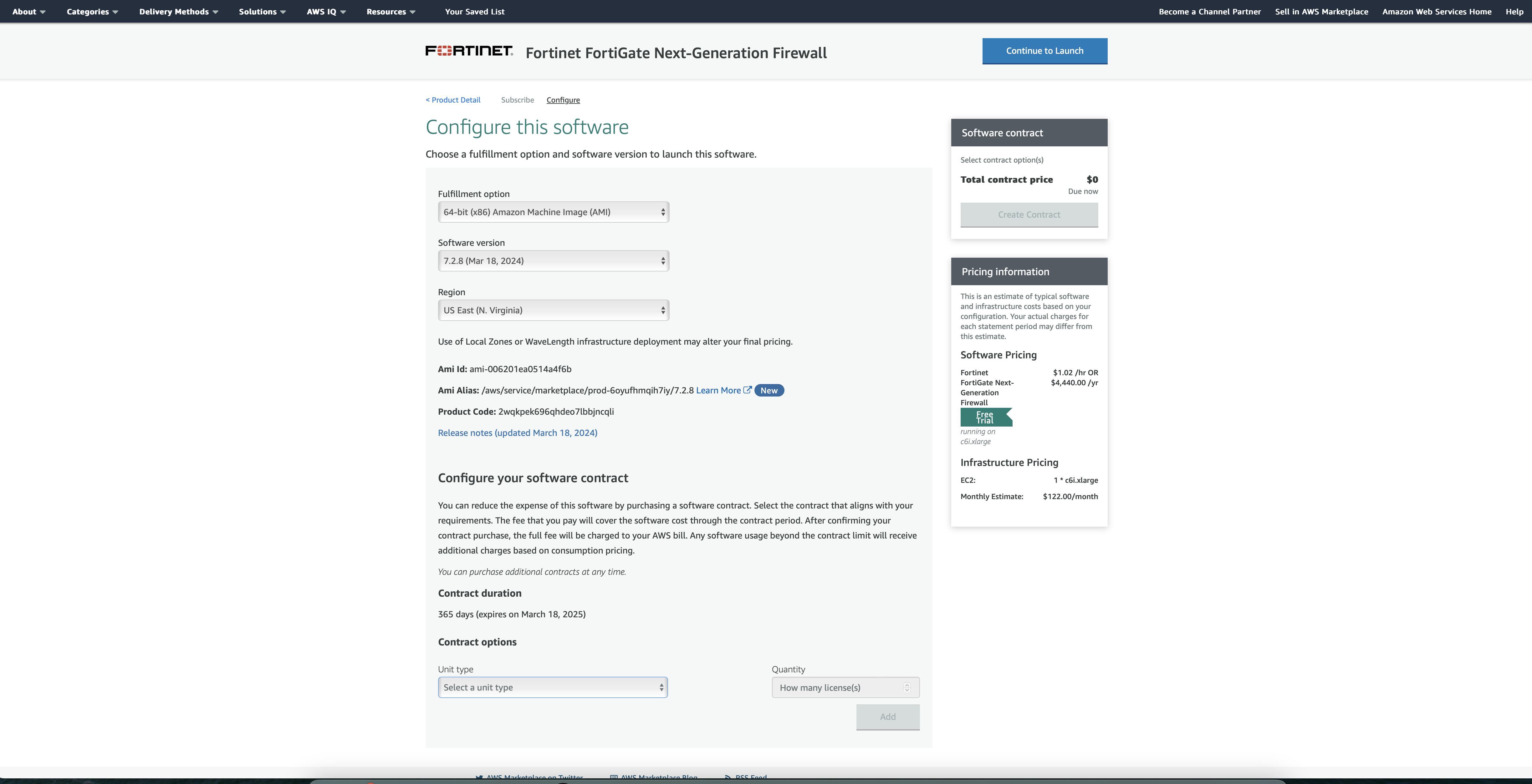
Deploy the firewall in Amazon Web Services (AWS). For this example, we are using Fortinet:

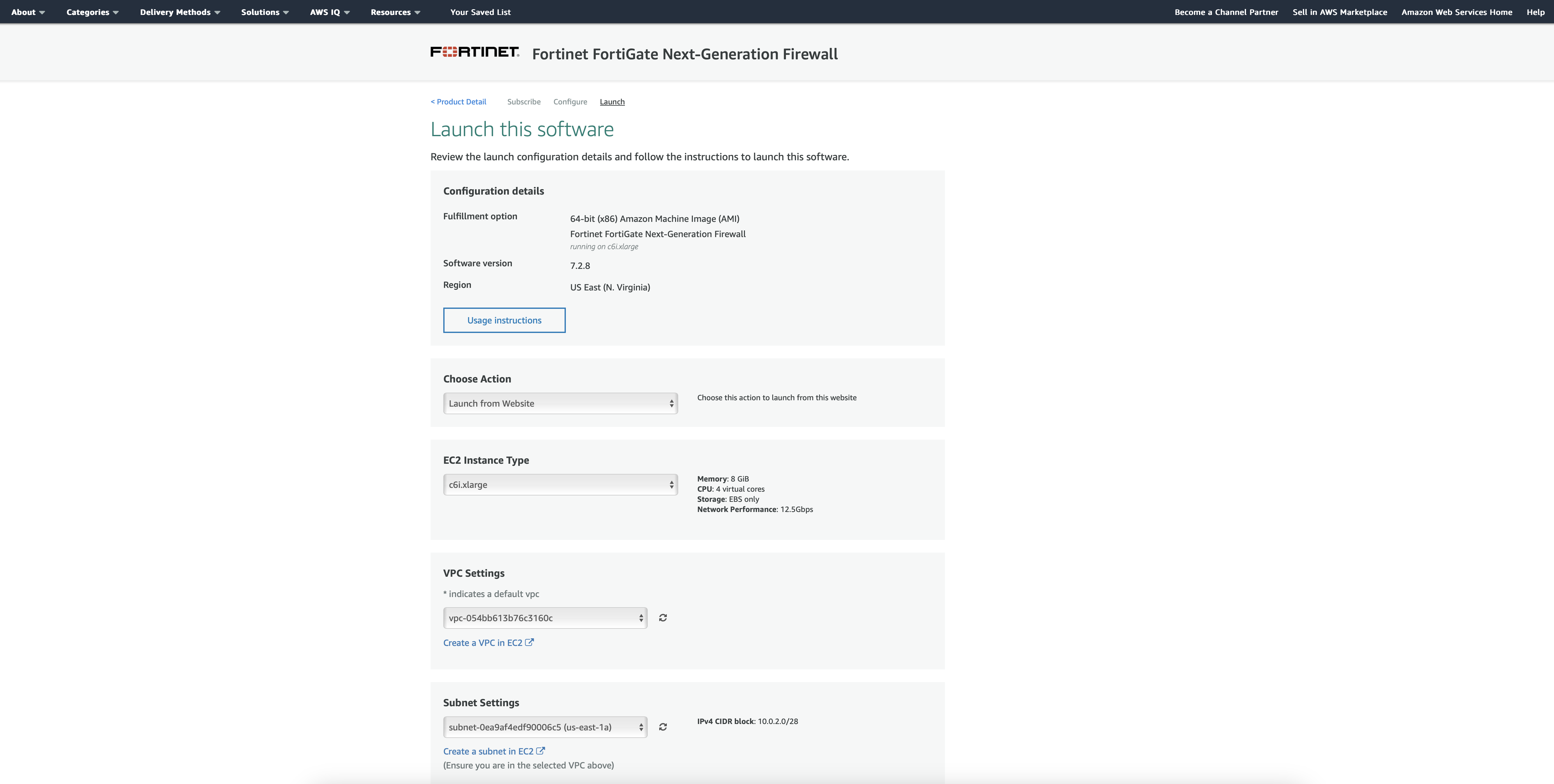
  1. Review Firewall options and pricing, then Click to Subscribe.

2. Once you have picked your instance type, Continue to Configuration.

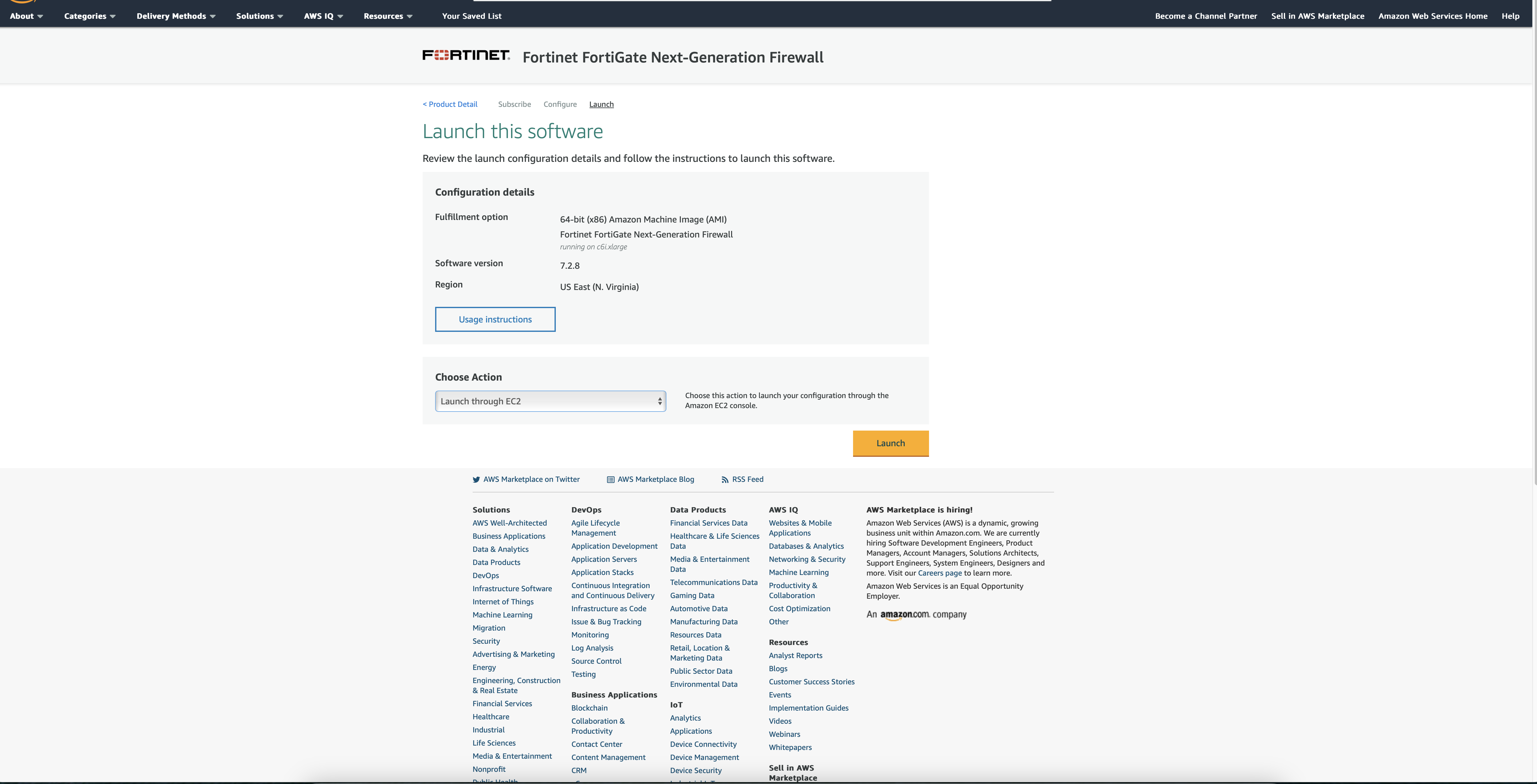
3. Review selection and Continue to Launch.

4. Launch the software from the website, or the EC2 dashboard – selected in the drop-down menu.

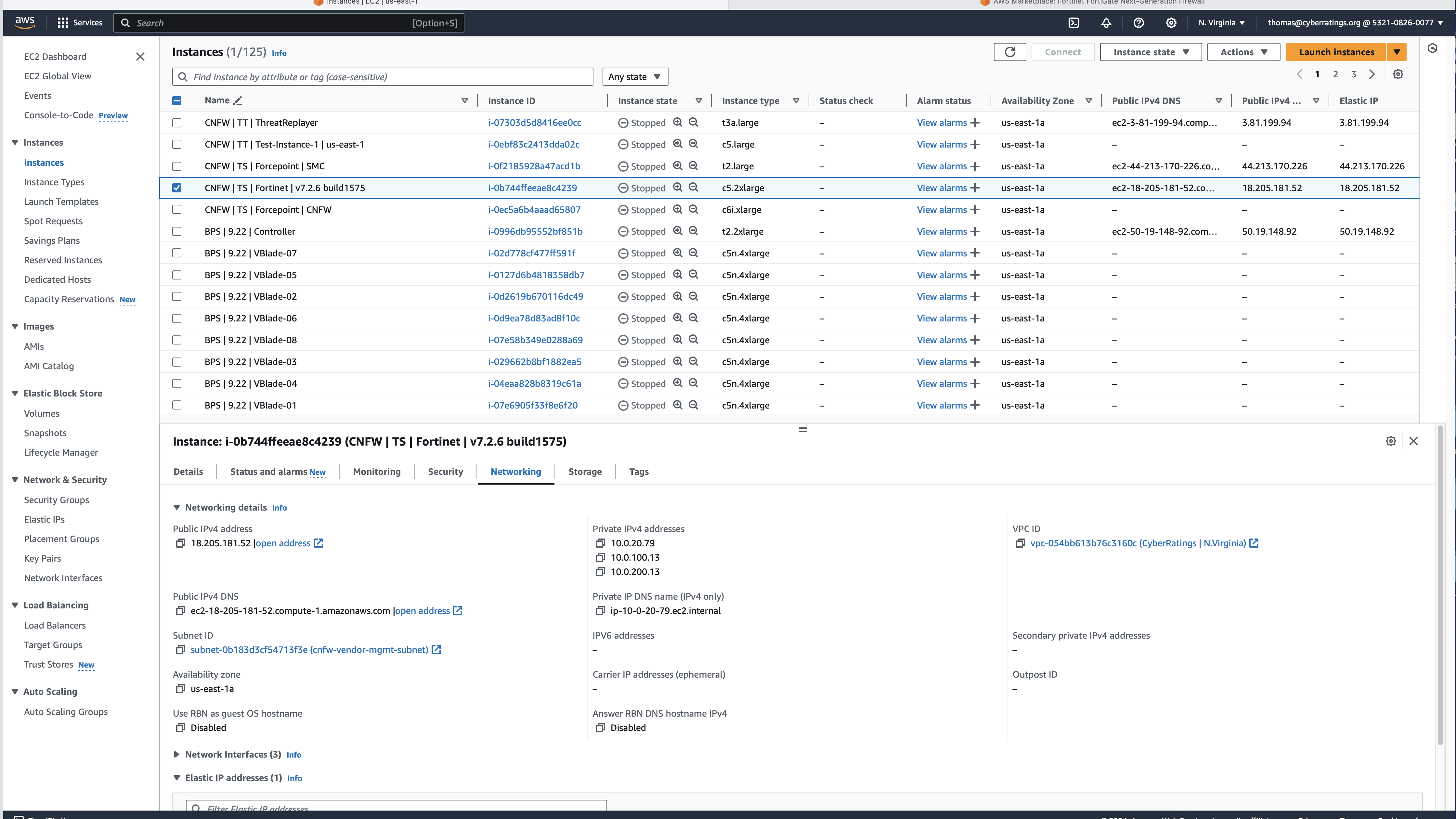
5. In the EC2 dashboard, define who has access to the firewall, launch Instance.

  • Connect the interfaces required for the topology. This is information that is found in each vendor guide.
  • Register the device to the centralized management system. This is information that is found in each vendor guide.
  • Validation of license/s, which in turn enabled software updates, threat updates, etc. This is information that is found in each vendor guide.
  • Define access policies:
    • Trust to untrust
    • Untrust to trust

  • Define IPS policies:
    • Enable threat signatures, advanced protection, cloud lookup, etc. Each product handles this differently, but this information is in their guides.
  • Upload the required server certs, keys, and CA certs if needed. This is information that is found in each vendor guide.
  • Define TLS decryption policies (1.2 and 1.3). Configure it to decrypt all traffic. We make a few exceptions to test whether the product can bypass decryption based on specific IP addresses or domain name(s). If something cannot be decrypted or is using an older TLS/SSL version and or an insecure cipher then the product is set to block.
  • Link IPS and TLS policies to the overall access policy.
  • Validate configuration:

Make sure you can pass traffic.

Make sure you can block attacks by sending something malicious.

Tune out false positives.

Firewall Configurations

For each firewall listed below, we have included:

  • Link to the AWS page where the firewall can be selected and deployed
  • Link to best practices and additional information

Amazon Web Services (AWS) Network Firewall

Product, best practices, and documentation: https://aws.amazon.com/network-firewall/

Following the best practices resulted in a deployment that was unable to stop any threats in our Cloud Network Firewall testing harness. After consulting AWS, we were instructed to make changes to the policy. The resulting deployment was successful in blocking 5.39%.

The configuration suggested by AWS:

  • No stateless rules

  • No default stateful action

  • Only Alert actions in the unmanaged signatures

This configuration should send all traffic through the inspection engine.

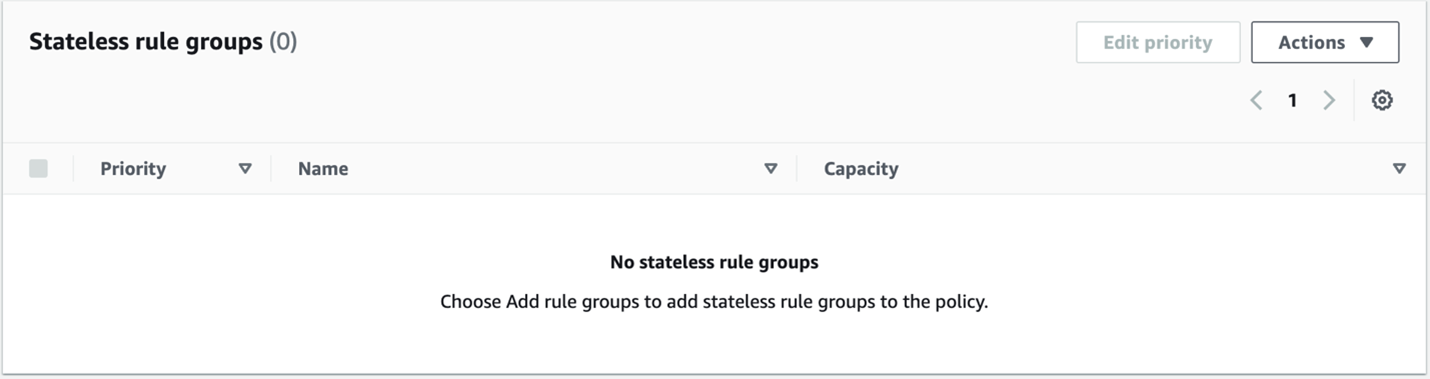
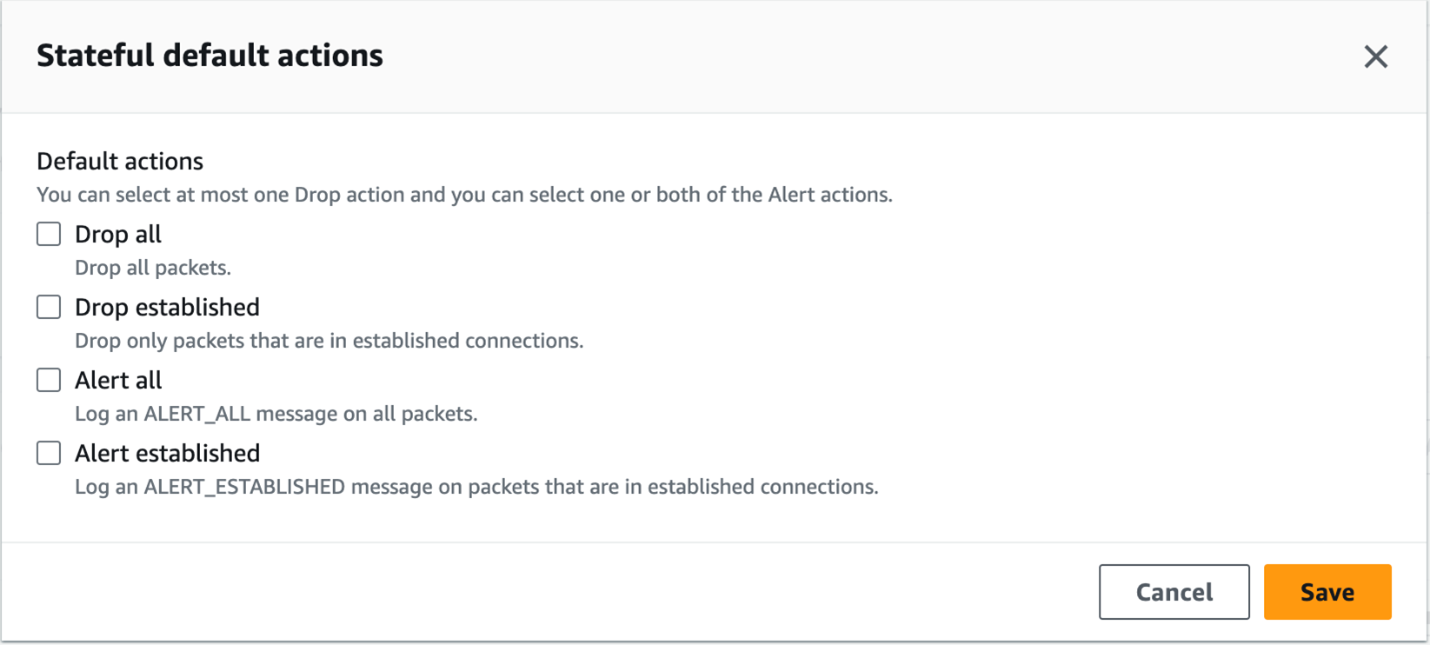
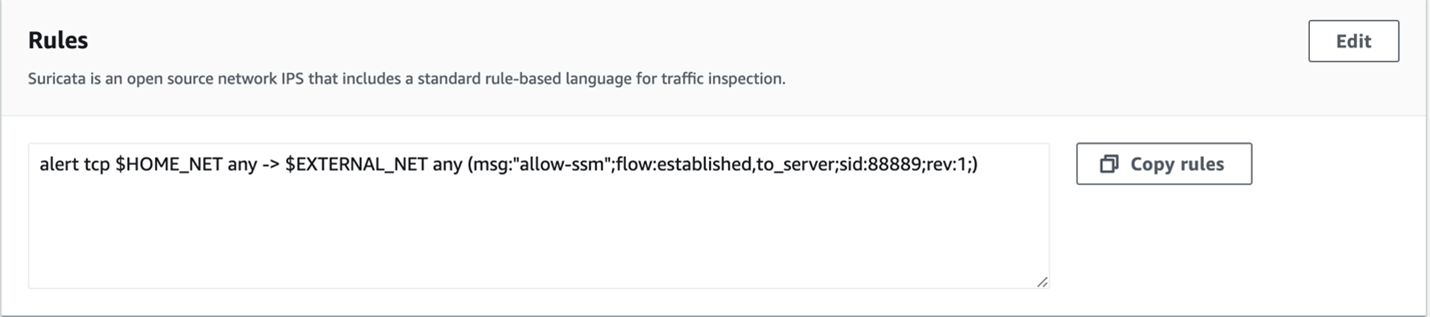
Our configuration that was tested before the conversation with AWS was slightly different. We had a rule for all stateless traffic to be forwarded to the stateful engine. Under the Stateful default actions, we had “Drop established,”“Alert all,” and “Alert established enabled. For rules we had the following:

alert tcp $HOME_NET any -> $EXTERNAL_NET any (msg:”allow-ssm”;flow:established,to_server;sid:88889;rev:1;)
pass tcp $HOME_NET any -> $EXTERNAL_NET any (msg:”allow-ssm”;flow:established,to_server;sid:8888;rev:1;)
pass tcp any any -> any any (msg:”allow-ssm”;flow:established,to_server;sid:888888;rev:1;)
pass UDP any any -> any any (msg:”allow-udp”;sid:88881;rev:1;)
pass ICMP any any -> any any (msg:”allowing-ourbuddyping”;sid:88882;rev:1;)

Both configurations resulted in the same security block rate of 5.39%.

Barracuda CloudGen Firewall

Follow their instructions; the product doesn’t require any special configuration.

Product page: https://aws.amazon.com/marketplace/pp/prodview-nf2s254wcmqfw

Documentation: https://campus.barracuda.com/product/cloudgenfirewall/doc/98209931/overview

Check Point CloudGuard

Follow their instructions; the product doesn’t require any special configuration.

Product page: https://aws.amazon.com/marketplace/pp/prodview-3xp7nph2367yc

Documentation: https://support.checkpoint.com

Cisco Secure Firewall Threat Defense Virtual

Follow their instructions; the product requires special configuration. See below.

We followed the best practices for deploying Cisco Secure Firewall Threat Defense Virtual including updating the software from 7.2.0 to 7.2.5-208 and then to 7.3.0-69.

We also registered the Cisco Secure Firewall Threat Defense into the Cisco Secure Firewall Management Center (FMC). We enabled TLS 1.2 and 1.3 following Cisco’s instructions. This included updating from Snort v2 to Snort v3, which is required to enable TLS 1.3—as per Cisco: “You must be using Snort 3 to match TLS 1.3 connections.” See https://www.cisco.com/c/en/us/td/docs/security/firepower/730/fdm/fptd-fdm-config-guide-730/fptd-fdm-ssl-decryption.html for more details.


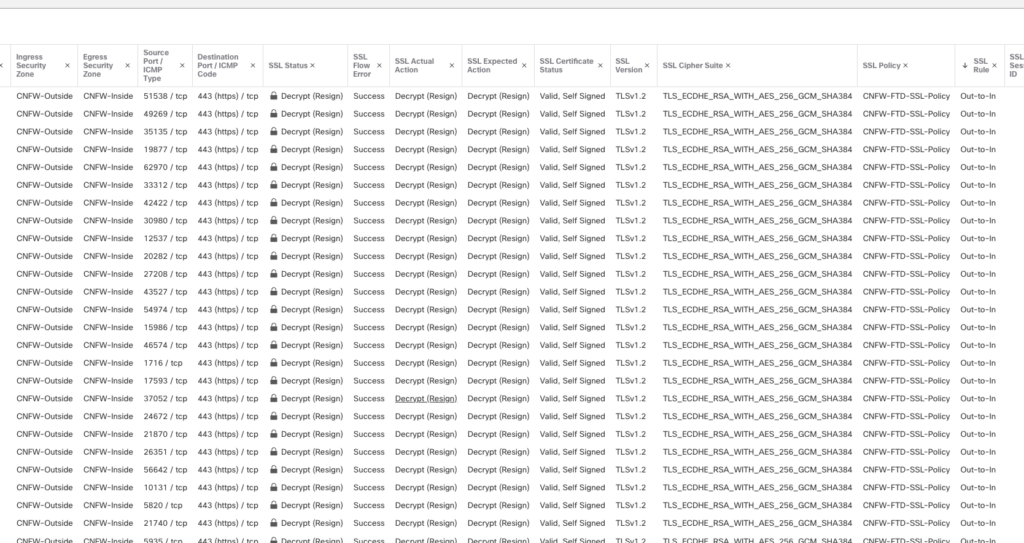
After deploying the firewall following their best practices, we were able to verify that TLS 1.2 was decrypting properly, as seen in this screenshot:

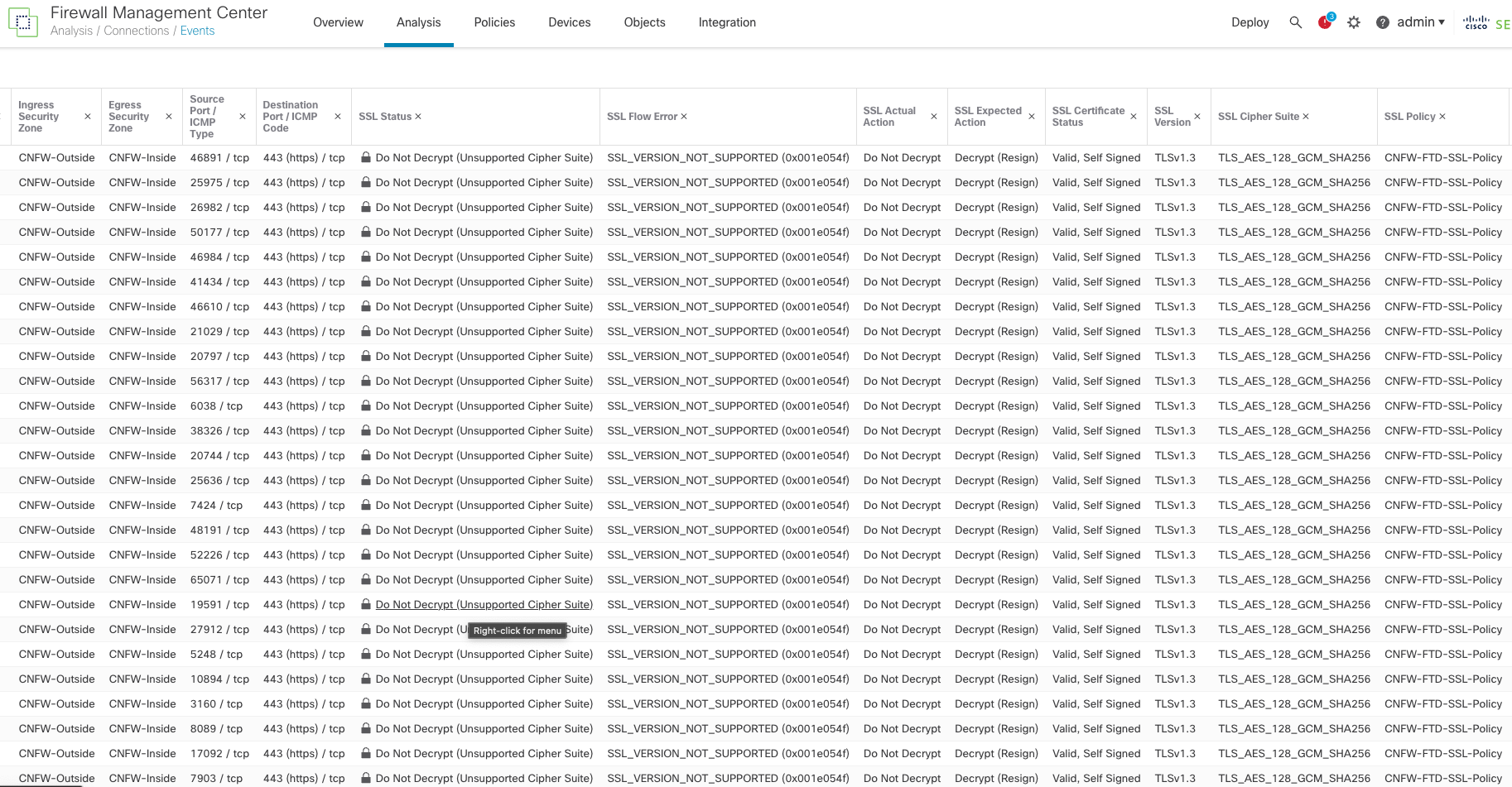
Even though we followed the instructions provided by Cisco to enable TLS 1.3, the Cisco Firewall failed to decrypt TLS 1.3 and the logs issued an “SSL_Version_Not_Supported” error, as seen in this screenshot:

Unless you look at the logs, the user interface does not indicate that TLS 1.3 is not being appropriately As shown in the above screenshots. you can check a box that is supposed to turn on TLS 1.3 support, but it does not turn it on. Moreover, while Cisco says TLS 1.3 is on, and when TLS 1.3 traffic is sent across the Cisco cloud firewall, the logs clearly state that the TLS/Cipher suites are not supported and do not decrypt the data. In addition, Cisco does not support the CHACHA20 cipher suites despite claiming otherwise.

Forcepoint NGFW

Follow their instructions; the product doesn’t require any special configuration.

Product page: https://aws.amazon.com/marketplace/pp/prodview-svzncd5l73lu2

Documentation: https://help.forcepoint.com/ngfw/en-us/7.0.4/index.html

Fortinet FortiGate-VM

Follow their instructions; the product doesn’t require any special configuration.

Product page: https://aws.amazon.com/marketplace/pp/prodview-wory773oau6wq

Documentation: https://docs.fortinet.com/document/fortigate/7.2.6/administration-guide/954635/getting-started

Juniper Networks vSRX

Follow their instructions; the product doesn’t require any special configuration.

Product page: https://aws.amazon.com/marketplace/pp/prodview-z7jcugjx442hw

Documentation: https://www.juniper.net/documentation/us/en/software/vsrx/vsrx-consolidated-deployment-guide/vsrx-consolidated-deployment-guide.pdf

Palo Alto Networks VM-Series Next-Generation Firewall w/ Advanced Threat Prevention

Follow their instructions; the product requires special configuration. See below.

Evasion defenses are not enabled by default. Please follow the instructions below. These are a combination of their best practices guide as well as additional instructions per the Palo Alto Engineers we worked with.

Product page: https://aws.amazon.com/marketplace/pp/prodview-mn63yjbq37n4c

Documentation: https://docs.paloaltonetworks.com/best-practices/security-policy-best-practices/security-policy-best-practices

Next, you will have to follow the detailed instructions as documented by Palo Alto Networks: https://docs.paloaltonetworks.com/pan-os/9-1/pan-os-admin/threat-prevention/best-practices-for-securing-your-network-from-layer-4-and-layer-7-evasions

After following those instructions, then issue the following commands in the command line interface (CLI).

To do this:

  • Enable SSH on the device.
  • Log in to the device with your admin credentials.
  • Run the following commands:

Set system setting ctd block-on-base64-decode-error enable
set system setting ctd block-on-bdat-chunk-decode-error enable
set system setting ctd block-on-chunk-decode-error enable
set system setting ctd block-on-qp-decode-error enable
set system setting ctd block-on-utf-decode-error enable
set system setting ctd block-on-uu-decode-error enable
set system setting ctd block-on-zip-decode-error enable

set deviceconfig setting session resource-limit-behavior bypass

request plugins vm_series set-cores dp-cores 3

While the below configuration change will not improve your evasion protection, it may improve your performance. If you are worried about client-side attacks, do not make this change!

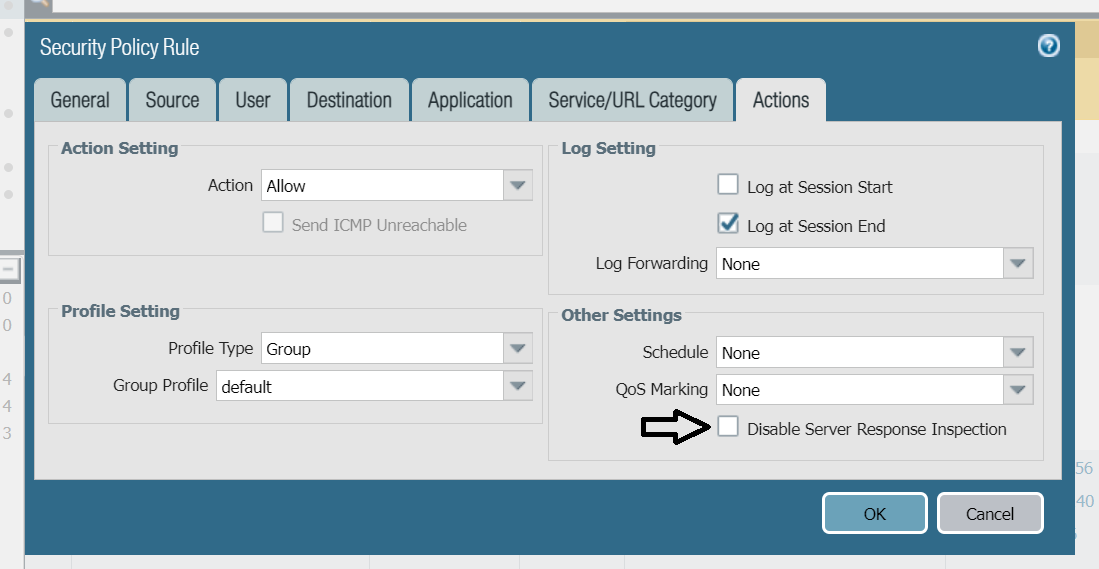
Disable Server Response Inspection (DSRI) – see screenshot below.

To Enable or disable DSRI:

  1. Go to Policies>Security>untrust-to-trust>Action.
  2. Check the “Other Settings “section for the DSRI option.
  3. Select the checkbox to enable.
  4. Unselect the checkbox to disable.

We have been informed that an upcoming version of the Palo Alto OS will enable these evasions by default.

Sophos Firewall

Follow their instructions; the product doesn’t require any special configuration.

Product page: https://aws.amazon.com/marketplace/pp/prodview-ga4qvij427bvw

Documentation: https://docs.sophos.com/nsg/sophos-firewall/20.0/help/en-us/webhelp/onlinehelp/index.html

Versa Networks NGFW

Follow their instructions; the product doesn’t require any special configuration.

Unlike the other products in this guide, Versa only offers a bring-your-own license (BOYL). This means products can be deployed using Versa Director (their central management system) or through EC2 on AWS.

Product page: https://aws.amazon.com/marketplace/pp/prodview-egtkta2usoxfa

Documentation: https://academy.versa-networks.com/versa-academy-library/

Documentation: https://docs.versa-networks.com

WatchGuard Firebox Cloud

Follow their instructions; the product doesn’t require any special configuration.

Product page: https://aws.amazon.com/marketplace/pp/prodview-5qg2dngtf3fgu

Documentation: https://www.watchguard.com/help/docs/help-center/en-US/Content/en-US/_intro/home.html

Exploring the Landscape of Cloud Network Firewalls Available on AWS

Today we focus on the diverse array of Cloud Network Firewalls available on Amazon Web Services (AWS). This comprehensive overview aims to inform IT professionals, network administrators, security analysts, and cybersecurity enthusiasts about the various firewall options on AWS, beyond just AWS’s native offerings.

Cloud Network Firewalls on AWS: A Broad Spectrum

AWS hosts a range of third-party cloud network firewalls, each offering unique features and capabilities tailored to different organizational needs. Here’s a rundown of some key players:

  1. Arista Networks Cloud Network Firewall
    Arista Networks provides a cloud network firewall offering for AWS environments, with a focus on traffic management and security. Its features include firewall capabilities, detailed traffic inspection, and policy enforcement tools. The offering is designed for compatibility with complex network architectures, providing various deployment options to meet diverse cloud security requirements.
  2. Barracuda CloudGen Firewall
    The Barracuda CloudGen Firewall, designed for AWS, offers security for cloud-connected networks. Its features encompass threat protection, VPN connectivity, and application-based traffic management. The firewall is developed to adapt to the evolving requirements of cloud infrastructures and includes centralized management for administration across distributed network setups.
  3. Check Point CloudGuard
    Check Point CloudGuard is a network security offering for AWS, including features like intrusion prevention, identity awareness, and anti-bot technology. It is designed for AWS service integration, aiming to protect cloud assets. CloudGuard supports auto-scaling to adapt its security measures in response to network traffic variations. This offering is intended for cloud environments, providing capabilities for managing security policies and handling network traffic.
  4. Cisco Cloud Network Firewall
    Known for its firepower series and ASA (Adaptive Security Appliances), Cisco offers a cloud network firewall tailored for AWS environments, equipped with features to manage network traffic and enforce security policies. This offering includes capabilities for inspecting and controlling traffic flow, as well as implementing security rules across cloud deployments. Designed to integrate with AWS, Cisco’s firewall aims to provide network security management suited to various cloud infrastructure requirements.
  5. Forcepoint Cloud Network Firewall
    Forcepoint’s cloud network firewall for AWS offers capabilities like SD-WAN integration and centralized management to safeguard network perimeters in cloud environments. The Forcepoint offering is structured to provide security management for cloud-based networks. It incorporates features for monitoring network activities and implementing security protocols to address potential threats.
  6. Fortinet FortiGate-VM: The Fortinet FortiGate-VM is a virtual firewall solution tailored for AWS environments, providing a range of network security capabilities. It offers features such as intrusion prevention, web filtering, and SSL inspection, aimed at safeguarding virtualized and cloud infrastructures. Key aspects include its ability to scale dynamically with AWS workloads, integration with AWS services for enhanced management and monitoring, and support for centralized control through Fortinet’s FortiManager. FortiGate-VM is designed to address various security requirements for AWS deployments, from basic VPC protection to advanced threat prevention, catering to diverse network architectures and compliance needs. As with any cloud network firewall solution, its effectiveness and suitability can vary based on specific organizational requirements and network configurations.
  7. Hillstone Networks: Focused on visibility and control, Hillstone offers advanced features for threat detection and mitigation. The offering includes capabilities for inspecting network activities and enforcing relevant security measures. Hillstone’s firewall is developed to support the security needs of cloud deployments, providing functionalities that facilitate the management of network traffic and the implementation of security policies in cloud environments.
  8. Juniper Networks vSRX Cloud Network Firewall
    Juniper Networks offers the vSRX Cloud Network Firewall for AWS, providing network traffic management and policy enforcement. This firewall includes features for monitoring network activities and implementing security protocols. The vSRX offering is designed for AWS environments, aiming to address various network security management needs in cloud infrastructures.
  9. Palo Alto Networks VM-Series
    The VM-Series from Palo Alto Networks is a cloud network firewall available on AWS, focusing on network traffic security and policy management. It offers features for inspecting network traffic and applying security rules. The VM-Series is developed to integrate with AWS, providing network security capabilities for different cloud deployment scenarios.
  10. Sophos UTM and XG Firewalls
    Sophos offers the UTM and XG Firewalls for AWS environments, delivering features to manage network security and traffic. These firewalls include tools for network activity monitoring and security protocol enforcement. Both the UTM and XG Firewalls by Sophos are structured to support security management in cloud-based networks, with functionalities aimed at maintaining network integrity and implementing necessary security measures.
  11. Versa Networks Cloud Network Firewall
    Versa Networks specializes in next-generation firewall capabilities integrated with SD-WAN, suitable for enterprises looking for a combination of security and network optimization. Its cloud network firewall solution for AWS is equipped to handle network security and traffic control. Versa Networks’ firewall is tailored for AWS cloud environments, focusing on meeting diverse network security management requirements in cloud infrastructures.

Choosing the Right Cloud Network Firewall on AWS

Selecting the right cloud network firewall on AWS depends on specific security requirements, scalability needs, and integration capabilities. Factors to consider include:

  • Security Features: Assess the firewall’s capability to protect against the specific threats your organization faces.
  • Performance and Scalability: Ensure the firewall can handle your current and projected traffic volumes without compromising performance.
  • Integration with AWS Services: Look for firewalls that offer seamless integration with other AWS services for streamlined security management.
  • Cost: Consider both upfront and ongoing costs associated with each firewall solution.

Conclusion

The choice of a cloud network firewall on AWS should be guided by your organization’s unique security, performance, and budgetary requirements. Each of the mentioned firewalls brings distinct advantages and specialties to the table, catering to a wide range of cloud-based security needs.

Stay tuned for our Cloud Network Firewall test results coming in March.