
CyberRatings.org Publishes Security Service Edge (SSE) “Mini-Test” Results Designed to Answer One Question: Are They Secure by Default?

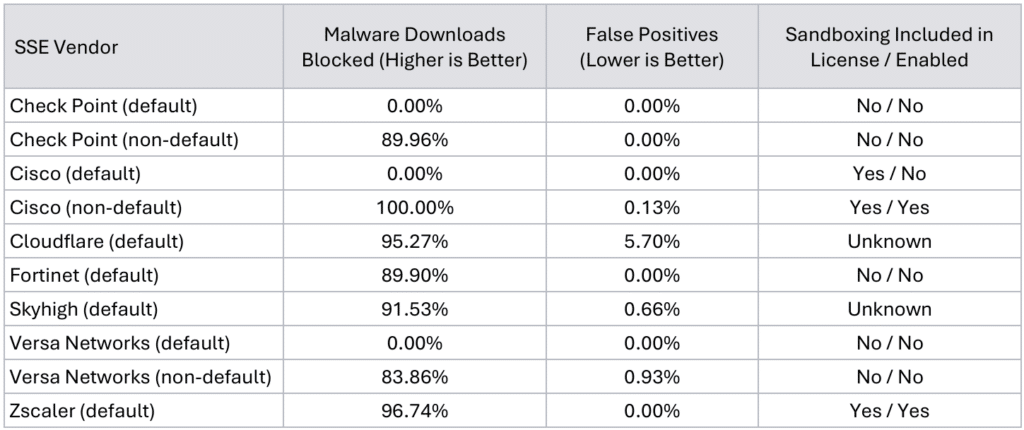
Austin, TX – October 3, 2024 – CyberRatings.org (CyberRatings), the non-profit entity dedicated to providing confidence in cybersecurity products and services through its research and testing programs, has published its first “Mini-Test.” This Mini-Test for Security Service Edge (SSE) products was focused on answering the question, “How secure are users if they rely on the vendors’ default configurations?” Tests showed four SSE products blocked between 89.90% to 96.74% of malware downloads, but three failed to block any malware at all (i.e. 0%).

“For products whose default configurations offered 0% protection, we made minor configuration changes to determine how much the protection could improve,” said Vikram Phatak, CEO of CyberRatings.org. “With those changes, we were able to achieve over 90% block rate on average. For products that offered effective defaults, no further adjustments were made.”

Research indicates that most customers expect cybersecurity vendors to ship with a high level of protection enabled by default. CISA states: “Secure-by-Default” means products are resilient against prevalent exploitation techniques out of the box without additional charge. These products protect against the most prevalent threats and vulnerabilities without end-users having to take additional steps to secure them. Secure-by-Default products are designed to make customers acutely aware that when they deviate from safe defaults, they are increasing the likelihood of compromise unless they implement additional compensating controls.”

SSE solutions are a subset of Secure Access Service Edge (SASE) that focus primarily on security services delivered through the cloud. SSE encompasses critical security functions such as Secure Web Gateways (SWG), Cloud Access Security Brokers (CASB), and Zero Trust Network Access (ZTNA), which work together to protect users, devices, and applications across distributed networks. SSE solutions improve flexibility and scalability, enabling enterprises to enforce security policies regardless of user location or device. SSE is particularly beneficial for organizations with a remote or hybrid workforce, as it provides consistent protection against threats, controls access to cloud services and ensures data security without relying on traditional network boundaries.

While some SSEs offer moderate malware protection by default, others do not. End-users should verify the security level their organizations require and assess whether the vendor’s default configuration meets their needs. If it does not, it is advisable to implement the vendor’s recommended configurations for an optimized solution. It should not be assumed that any vendor solution will be secure by default. 

Key Findings:

  • The level of security offered by default varies greatly across SSE vendors. Three out of seven SSE vendors tested offered no security by default.
  • In some cases, minor changes from a vendor’s supplied default configuration dramatically improved the security posture of an SSE solution. We observed improvements in malware blocking from 0% to >90% on average.
  • SSE customers should not assume any level of security by default without verification.
  • SSE customers should understand where the SSE they use stands by default, and whether that default offers the required level of security for their environment.
  • SSE customers should be aware of the potential default options and their implications during any guided setup offered, which may not provide the required level of security. This can be a risk when leveraging non-technical staff for initial setup and configuration.

SSE “Mini-Test” Results:
Further details can be found in the report at CyberRatings.org.

Keysight provides technology and support for CyberRatings testing programs.

Best Practices for Enterprise Firewall Deployment in 2024

As previously announced, the security industry is working towards a secure-by-default configuration.

This is still an ongoing process; however, we already see vendors making improvements from when we published the cloud network firewall group test. In that test, we found that not all products were secure by default. Therefore, we documented the changes we made and published them. We are doing the same for this group test.

Last year, the Cybersecurity & Infrastructure Security Agency (CISA), along with ten U.S. and international partners, published guidelines for their “Secure by Design, Secure by Default” principle. In their April 2023 publication, they stated the following:

“Secure-by-Default” means products are resilient against prevalent exploitation techniques out of the box without additional charge. These products protect against the most prevalent threats and vulnerabilities without end-users having to take additional steps to secure them. Secure-by-Default products are designed to make customers acutely aware that when they deviate from safe defaults, they are increasing the likelihood of compromise unless they implement additional compensating controls.

This guide should complement what the vendors already provide to their customers. Please refer to the links below for the best practices and guides for each vendor we tested. We have also included extra information for one vendor: Cisco.

The following steps were taken for each firewall:

  • Deploy the firewall in our lab in Austin, Texas (we are using Fortinet for this example).
  • Connect the interfaces required for the topology. This information can be found in each vendor guide.
  • Register the device to the centralized management system where needed. For our test, we only used centralized management for Cisco and Versa Networks. For Cisco, it is required to get some functionality working; more on this below. For Versa Networks, it’s both recommended and needed from a licensing perspective. This is information that is found in each vendor guide.
  • Validation of licenses, which, in turn, enable software updates, threat updates, etc. This information is found in each vendor guide.
  • Define access policies:
    • Trust to untrust
    • Untrust to trust
  • Define IPS policies:
    • Enable threat signatures, advanced protection, cloud lookup, etc. Each product handles this differently, but this information is in their guides.
  • Upload the required server certs, keys, and CA certs if necessary. This information is available in each vendor guide.
  • Define TLS decryption policies for versions 1.2 and 1.3. Configure them to decrypt all traffic. We make a few exceptions to test if the product can bypass decryption based on specific IP addresses or domain names. If something cannot be decrypted or is using an older TLS/SSL version or an insecure cipher, then the product is set to block.
  • Link IPS and TLS policies to the overall access policy.
  • Validate configuration:
    • Make sure you can pass traffic.
    • Make sure you can block attacks by sending something malicious. Tune out false positives where possible. If we couldn’t do so without disabling security or if it was practically impossible, we listed the false positive rate in the test report. Please refer to individual test reports for more details.

For each firewall listed below, we have included a link to best practices and additional information.

Firewalls Tested:


Check Point Quantum Force 19200 plus

https://www.checkpoint.com/downloads/products/quantum-force-19200-datasheet.pdf

Firmware: R81.20 Jumbo Hotfix Take 45
IPS Version: 635242922
Configuration: 2 x 40G – 1 port-pairs

Follow their instructions; the product doesn’t require any special configuration.

Documentation: https://support.checkpoint.com


Cisco Firepower 2130

https://www.cisco.com/c/en/us/products/collateral/security/firepower-2100-series/datasheet-c78-742473.html

Firmware: Threat Defense v7.3.1 (build 19)
IPS Version: 384
Configuration: 4 x 10G – 2 port-pairs

Follow their instructions; the product requires special configuration; see below.

Documentation: https://www.cisco.com/c/en/us/support/security/firepower-ngfw/products-installation-and-configuration-guides-list.html

We also registered the Cisco Secure Firewall Threat Defense into the Cisco Secure Firewall Management Center (FMC). We enabled TLS 1.2 and 1.3 following Cisco’s instructions. This included updating from Snort v2 to Snort v3, which is required to enable TLS 1.3—as per Cisco: “You must be using Snort 3 to match TLS 1.3 connections.” See https://www.cisco.com/c/en/us/td/docs/security/firepower/730/fdm/fptd-fdm-config-guide-730/fptd-fdm-ssl-decryption.html for more details. This link also provides information about how to make TLS 1.2 and TLS 1.3 work, while also blocking other SSL/TLS version.

Note: Cisco does not support the CHACHA20 cipher suites despite claiming otherwise.

The following screenshot shows the instructions required for achieving our test’s use case.


Forcepoint 3410 NGFW

https://www.forcepoint.com/sites/default/files/resources/datasheets/datasheet-forcepoint-ngfw-3400-series-appliance-en_0.pdf

Firmware: 7.1.1 build 29059
IPS Version: 1707
Configuration: 2 x 40G – 1 port-pairs

Follow their instructions; the product doesn’t require any special configuration.

Note: From version 7.1, Forcepoint Next Generation Firewall is rebranded to Forcepoint FlexEdge Secure SD-WAN.

Documentation: https://support.forcepoint.com/s/article/FlexEdge-Secure-SD-WAN


Fortinet FortiGate-900G

https://www.fortinet.com/content/dam/fortinet/assets/data-sheets/fortigate-900g-series.pdf

Firmware: v7.4.4 GA
IPS Version: 27.00783
Configuration: 4 x 10G – 2 port-pairs

Follow their instructions; the product doesn’t require any special configuration.

Documentation: https://docs.fortinet.com/document/fortigate/7.4.4/administration-guide/954635/getting-started


Juniper Networks SRX4600

https://www.juniper.net/us/en/products/security/srx-series/srx4600-firewall-datasheet.html

Firmware: JUNOS 22.4X3.1 srx4600
IPS Version: 3701
Configuration: 2 x 40G – 2 port-pairs

Follow their instructions; the product doesn’t require any special configuration.

Documentation: https://www.juniper.net/documentation/product/us/en/srx4600/junos-os/


Palo Alto Networks PA-450

https://docs.paloaltonetworks.com/hardware/pa-400-hardware-reference/pa-400-firewall-specifications

Firmware: 11.1.1
IPS Version: Threat Version: 2024-05-14 (8849-8746)

AntiVirus Version: 2024-05-14 (4818-5336)

Configuration: 4 x 1G – 2 port-pairs

Follow their instructions; the product doesn’t require any special configuration.

Evasion defenses are now enabled by default, using their latest update. To verify this is the case, please follow the instructions below.

Documentation: https://docs.paloaltonetworks.com/best-practices

Next, you will have to follow the detailed instructions as documented by Palo Alto Networks: https://docs.paloaltonetworks.com/advanced-threat-prevention/administration/threat-prevention/best-practices-for-securing-your-network-from-layer-4-and-layer-7-evasions

After following those instructions, issue the commands in the command line interface (CLI).

To do this:

  • You will have to enable SSH on the device.
  • Then, log in to the device with your admin credentials.
  • Then, run the following commands:

Set system setting ctd block-on-base64-decode-error enable
set system setting ctd block-on-bdat-chunk-decode-error enable
set system setting ctd block-on-chunk-decode-error enable
set system setting ctd block-on-qp-decode-error enable
set system setting ctd block-on-utf-decode-error enable
set system setting ctd block-on-uu-decode-error enable
set system setting ctd block-on-zip-decode-error enable

set deviceconfig setting session resource-limit-behavior bypass


Sangfor NGAF 5300

https://www.sangfor.com/sites/default/files/2022-06/NGAF_DS_P_NGAF53-Datasheet_20220531.pdf

Firmware AF 8.0.85.1029 Build 20240423
IPS Version 2024-04-23 (Vulnerability Database)
Configuration 2 x 10G – 1 port-pairs

Follow their instructions; the product doesn’t require any special configuration.

Documentation: https://community.sangfor.com/plugin.php?id=sangfor_databases%3Aindex#?Product=NGAF&Document=Configuration%20Guide&Language=English


Versa Networks CSG5000

https://versa-networks.com/documents/datasheets/versa-csg5000-series.pdf

Firmware versa-flexvnf-20240405-041659-5186a33-22.1.4-B
IPS Version 6446
Configuration 5 x 10G – 5 port-pairs (limited to 40G)

Follow their instructions; the product doesn’t require any special configuration.

Documentation: https://academy.versa-networks.com/versa-academy-library/

Documentation: https://docs.versa-networks.com

2024 Best Practices for Cloud Network Firewall Deployment

The security industry is working towards a secure by default configuration. However, when setting up products for the 2024 Cloud Network Firewall group test, we found that not all products are secure by default. We, therefore, documented the changes we made and are publishing them in this guide.

Last year, the Cybersecurity & Infrastructure Security Agency (CISA), along with ten U.S. and international partners, published guidelines for their “Secure by Design, Secure by Default” principle. In their April 2023 publication, they stated the following:

“Secure-by-Default” means products are resilient against prevalent exploitation techniques out of the box without additional charge. These products protect against the most prevalent threats and vulnerabilities without end-users having to take additional steps to secure them. Secure-by-Default products are designed to make customers acutely aware that when they deviate from safe defaults, they are increasing the likelihood of compromise unless they implement additional compensating controls.

This guide should be used as a supplement to what the vendors already make available to their customers. Please see the links below to the best practices and guides for each product we tested. We have also provided additional information for three products: Cisco Secure Firewall Threat Defense Virtual, Palo Alto Networks VM-Series, and Amazon Web Services (AWS) Network Firewall.

Cloud Network Firewall Test Topology

The following steps were taken for each firewall:

Deploy the firewall in Amazon Web Services (AWS). For this example, we are using Fortinet:

  1. Review Firewall options and pricing, then Click to Subscribe.

2. Once you have picked your instance type, Continue to Configuration.

3. Review selection and Continue to Launch.

4. Launch the software from the website, or the EC2 dashboard – selected in the drop-down menu.

5. In the EC2 dashboard, define who has access to the firewall, launch Instance.

  • Connect the interfaces required for the topology. This is information that is found in each vendor guide.
  • Register the device to the centralized management system. This is information that is found in each vendor guide.
  • Validation of license/s, which in turn enabled software updates, threat updates, etc. This is information that is found in each vendor guide.
  • Define access policies:
    • Trust to untrust
    • Untrust to trust

  • Define IPS policies:
    • Enable threat signatures, advanced protection, cloud lookup, etc. Each product handles this differently, but this information is in their guides.
  • Upload the required server certs, keys, and CA certs if needed. This is information that is found in each vendor guide.
  • Define TLS decryption policies (1.2 and 1.3). Configure it to decrypt all traffic. We make a few exceptions to test whether the product can bypass decryption based on specific IP addresses or domain name(s). If something cannot be decrypted or is using an older TLS/SSL version and or an insecure cipher then the product is set to block.
  • Link IPS and TLS policies to the overall access policy.
  • Validate configuration:

Make sure you can pass traffic.

Make sure you can block attacks by sending something malicious.

Tune out false positives.

Firewall Configurations

For each firewall listed below, we have included:

  • Link to the AWS page where the firewall can be selected and deployed
  • Link to best practices and additional information

Amazon Web Services (AWS) Network Firewall

Product, best practices, and documentation: https://aws.amazon.com/network-firewall/

Following the best practices resulted in a deployment that was unable to stop any threats in our Cloud Network Firewall testing harness. After consulting AWS, we were instructed to make changes to the policy. The resulting deployment was successful in blocking 5.39%.

The configuration suggested by AWS:

  • No stateless rules

  • No default stateful action

  • Only Alert actions in the unmanaged signatures

This configuration should send all traffic through the inspection engine.

Our configuration that was tested before the conversation with AWS was slightly different. We had a rule for all stateless traffic to be forwarded to the stateful engine. Under the Stateful default actions, we had “Drop established,”“Alert all,” and “Alert established enabled. For rules we had the following:

alert tcp $HOME_NET any -> $EXTERNAL_NET any (msg:”allow-ssm”;flow:established,to_server;sid:88889;rev:1;)
pass tcp $HOME_NET any -> $EXTERNAL_NET any (msg:”allow-ssm”;flow:established,to_server;sid:8888;rev:1;)
pass tcp any any -> any any (msg:”allow-ssm”;flow:established,to_server;sid:888888;rev:1;)
pass UDP any any -> any any (msg:”allow-udp”;sid:88881;rev:1;)
pass ICMP any any -> any any (msg:”allowing-ourbuddyping”;sid:88882;rev:1;)

Both configurations resulted in the same security block rate of 5.39%.

Barracuda CloudGen Firewall

Follow their instructions; the product doesn’t require any special configuration.

Product page: https://aws.amazon.com/marketplace/pp/prodview-nf2s254wcmqfw

Documentation: https://campus.barracuda.com/product/cloudgenfirewall/doc/98209931/overview

Check Point CloudGuard

Follow their instructions; the product doesn’t require any special configuration.

Product page: https://aws.amazon.com/marketplace/pp/prodview-3xp7nph2367yc

Documentation: https://support.checkpoint.com

Cisco Secure Firewall Threat Defense Virtual

Follow their instructions; the product requires special configuration. See below.

We followed the best practices for deploying Cisco Secure Firewall Threat Defense Virtual including updating the software from 7.2.0 to 7.2.5-208 and then to 7.3.0-69.

We also registered the Cisco Secure Firewall Threat Defense into the Cisco Secure Firewall Management Center (FMC). We enabled TLS 1.2 and 1.3 following Cisco’s instructions. This included updating from Snort v2 to Snort v3, which is required to enable TLS 1.3—as per Cisco: “You must be using Snort 3 to match TLS 1.3 connections.” See https://www.cisco.com/c/en/us/td/docs/security/firepower/730/fdm/fptd-fdm-config-guide-730/fptd-fdm-ssl-decryption.html for more details.


After deploying the firewall following their best practices, we were able to verify that TLS 1.2 was decrypting properly, as seen in this screenshot:

Even though we followed the instructions provided by Cisco to enable TLS 1.3, the Cisco Firewall failed to decrypt TLS 1.3 and the logs issued an “SSL_Version_Not_Supported” error, as seen in this screenshot:

Unless you look at the logs, the user interface does not indicate that TLS 1.3 is not being appropriately As shown in the above screenshots. you can check a box that is supposed to turn on TLS 1.3 support, but it does not turn it on. Moreover, while Cisco says TLS 1.3 is on, and when TLS 1.3 traffic is sent across the Cisco cloud firewall, the logs clearly state that the TLS/Cipher suites are not supported and do not decrypt the data. In addition, Cisco does not support the CHACHA20 cipher suites despite claiming otherwise.

Forcepoint NGFW

Follow their instructions; the product doesn’t require any special configuration.

Product page: https://aws.amazon.com/marketplace/pp/prodview-svzncd5l73lu2

Documentation: https://help.forcepoint.com/ngfw/en-us/7.0.4/index.html

Fortinet FortiGate-VM

Follow their instructions; the product doesn’t require any special configuration.

Product page: https://aws.amazon.com/marketplace/pp/prodview-wory773oau6wq

Documentation: https://docs.fortinet.com/document/fortigate/7.2.6/administration-guide/954635/getting-started

Juniper Networks vSRX

Follow their instructions; the product doesn’t require any special configuration.

Product page: https://aws.amazon.com/marketplace/pp/prodview-z7jcugjx442hw

Documentation: https://www.juniper.net/documentation/us/en/software/vsrx/vsrx-consolidated-deployment-guide/vsrx-consolidated-deployment-guide.pdf

Palo Alto Networks VM-Series Next-Generation Firewall w/ Advanced Threat Prevention

Follow their instructions; the product requires special configuration. See below.

Evasion defenses are not enabled by default. Please follow the instructions below. These are a combination of their best practices guide as well as additional instructions per the Palo Alto Engineers we worked with.

Product page: https://aws.amazon.com/marketplace/pp/prodview-mn63yjbq37n4c

Documentation: https://docs.paloaltonetworks.com/best-practices/security-policy-best-practices/security-policy-best-practices

Next, you will have to follow the detailed instructions as documented by Palo Alto Networks: https://docs.paloaltonetworks.com/pan-os/9-1/pan-os-admin/threat-prevention/best-practices-for-securing-your-network-from-layer-4-and-layer-7-evasions

After following those instructions, then issue the following commands in the command line interface (CLI).

To do this:

  • Enable SSH on the device.
  • Log in to the device with your admin credentials.
  • Run the following commands:

Set system setting ctd block-on-base64-decode-error enable
set system setting ctd block-on-bdat-chunk-decode-error enable
set system setting ctd block-on-chunk-decode-error enable
set system setting ctd block-on-qp-decode-error enable
set system setting ctd block-on-utf-decode-error enable
set system setting ctd block-on-uu-decode-error enable
set system setting ctd block-on-zip-decode-error enable

set deviceconfig setting session resource-limit-behavior bypass

request plugins vm_series set-cores dp-cores 3

While the below configuration change will not improve your evasion protection, it may improve your performance. If you are worried about client-side attacks, do not make this change!

Disable Server Response Inspection (DSRI) – see screenshot below.

To Enable or disable DSRI:

  1. Go to Policies>Security>untrust-to-trust>Action.
  2. Check the “Other Settings “section for the DSRI option.
  3. Select the checkbox to enable.
  4. Unselect the checkbox to disable.

We have been informed that an upcoming version of the Palo Alto OS will enable these evasions by default.

Sophos Firewall

Follow their instructions; the product doesn’t require any special configuration.

Product page: https://aws.amazon.com/marketplace/pp/prodview-ga4qvij427bvw

Documentation: https://docs.sophos.com/nsg/sophos-firewall/20.0/help/en-us/webhelp/onlinehelp/index.html

Versa Networks NGFW

Follow their instructions; the product doesn’t require any special configuration.

Unlike the other products in this guide, Versa only offers a bring-your-own license (BOYL). This means products can be deployed using Versa Director (their central management system) or through EC2 on AWS.

Product page: https://aws.amazon.com/marketplace/pp/prodview-egtkta2usoxfa

Documentation: https://academy.versa-networks.com/versa-academy-library/

Documentation: https://docs.versa-networks.com

WatchGuard Firebox Cloud

Follow their instructions; the product doesn’t require any special configuration.

Product page: https://aws.amazon.com/marketplace/pp/prodview-5qg2dngtf3fgu

Documentation: https://www.watchguard.com/help/docs/help-center/en-US/Content/en-US/_intro/home.html

Dr. Allan Friedman of CISA and Vikram Phatak Discuss Secure by Default

CyberRatings’ CEO, Vikram Phatak, and CISA’s Senior Advisor and Strategist, Dr. Allan Friedman, discuss why enterprises need to harden defenses and what the impact will be when security vendors build their products to be Secure by Default. CISA, along with its US and International cyber partners, outlined joint guidance last year on Secure by Design and Secure by Default standards.

Watch the webinar here.

CISA’s “Secure by Design, Secure by Default” gets it right

I was recently at Black Hat and DefCon in Las Vegas and was excited to reconnect with Dr. Allan Friedman from the Cybersecurity and Infrastructure Security Agency (CISA). Among the many cyber issues being addressed by CISA today, it was reassuring to hear that their “Secure by Design, Secure by Default” initiative is gaining traction.

I have been testing cybersecurity products since 2007 – first at NSS Labs, and now at CyberRatings.org – and continue to be surprised when some vendors ship products to customers without including a secure configuration as a default baseline.

Research indicates that most customers expect cybersecurity vendors to ship with a high level of protection enabled by default. CISA’s publication states the following:¹

“Secure-by-Default” means products are resilient against prevalent exploitation techniques out of the box without additional charge. These products protect against the most prevalent threats and vulnerabilities without end-users having to take additional steps to secure them. Secure-by-Default products are designed to make customers acutely aware that when they deviate from safe defaults, they are increasing the likelihood of compromise unless they implement additional compensating controls.

A secure configuration should be the default baseline. Secure-by-Default products automatically enable the most important security controls needed to protect enterprises from malicious cyber actors, as well as provide the ability to use and further configure security controls at no additional cost.

The complexity of security configuration should not be a customer problem. Organizational IT staff are frequently overloaded with security and operational responsibilities, thus resulting in limited time to understand and implement the security implications and mitigations required for a robust cybersecurity posture. Through optimizing secure product configuration—securing the “default path”— manufacturers can aid their customers by ensuring their products are manufactured, distributed, and used securely in accordance with “Secure-by-Default” standards.

Manufacturers of products that are “Secure-by-Default” do not charge extra for implementing additional security configurations. Instead, they include them in the base product like seatbelts are included in all new cars. Security is not a luxury option but is closer to the standard every customer should expect without negotiating or paying more.²

CyberRatings.org has been and will continue to test every product with the vendor default (pre-defined recommended) policies and configurations. In addition, there will be a requirement that the security products have all options for evasion defenses enabled by default in the shipped product. We continue this tradition with our upcoming test of Cloud Network Firewalls. Our latest methodology was released today.

We are glad that we are in alignment with CISA and look forward to expanding our efforts to support their “Secure by Design, Secure by Default” initiative.

Vikram Phatak

CEO, CyberRatings.org

¹ https://www.cisa.gov/resources-tools/resources/secure-by-design-and-default

² https://www.cisa.gov/sites/default/files/2023-06/principles_approaches_for_security-by-design-default_508c.pdf